> ## Documentation Index
> Fetch the complete documentation index at: https://arize-ax.mintlify.site/docs/llms.txt
> Use this file to discover all available pages before exploring further.
# Offline Evaluation
> How to run evaluators outside Arize — the download → classify → upload pattern, the package boundary between arize, phoenix.evals, and arize.experiments, and the join key that ties results back to spans.
Most evaluators belong on the Arize AX platform. But sometimes the platform isn't enough — you need a multi-stage pipeline, a model Arize AX doesn't support, custom data shaping, or full control over rate-limiting and concurrency. That's what offline evaluation is for.
This page covers the offline pattern at the concept level. The code shapes are illustrative — they show what each step looks like, not a runnable guide. For a runnable end-to-end example, see the [Evaluation guide](/ax/cookbooks/evaluate/evaluation).
# The three-step pattern
Offline evaluation always follows the same shape:
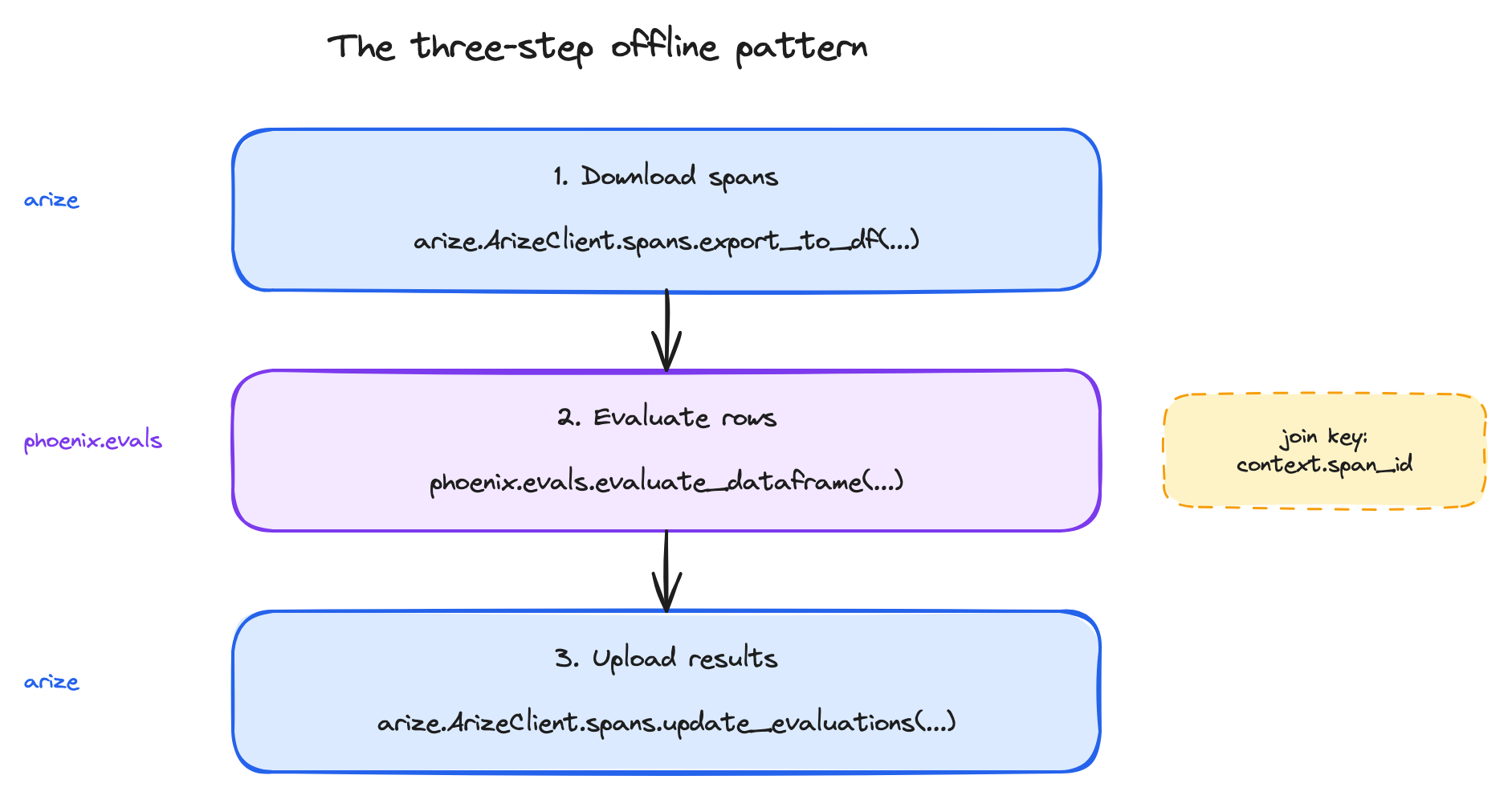
The three steps each live in a different package. That's the first thing to understand about the offline path:
| Step | Package | What it provides |
| :------------- | :------------------------------------------------------------ | :------------------------------------------------------------------------------------ |
| Download | `arize` (the Arize AX SDK) | The client and the `spans.export_to_df` method |
| Evaluate | `phoenix.evals` (the open-source Phoenix evaluations library) | `LLM`, `create_classifier`, `evaluate_dataframe`, and the rest of the eval primitives |
| Upload | `arize` (the Arize AX SDK) | `spans.update_evaluations` |
| Result wrapper | `arize.experiments` | `EvaluationResult` — the shared data class for results |
Phoenix here is a **library**, not a separate service. Using `phoenix.evals` doesn't require running a Phoenix server. It's installed alongside `arize` and called from your offline script.
# Step 1: download the spans
The download step pulls a dataframe of spans from Arize AX into memory. The shape:
```python theme={null}
from datetime import datetime
from arize import ArizeClient
client = ArizeClient(api_key=ARIZE_API_KEY)
spans_df = client.spans.export_to_df(
space_id=ARIZE_SPACE_ID,
project_name="my-project",
start_time=datetime.fromisoformat("2026-03-05T00:00:00+00:00"),
end_time=datetime.fromisoformat("2026-03-10T00:00:00+00:00"),
where="name = 'agent_span'",
columns=[
"context.span_id",
"attributes.input.value",
"attributes.output.value",
],
)
```
The arguments worth knowing about at the concept level:
* **`start_time`, `end_time`** — the time window to pull. Required.
* **`where`** — a SQL-like filter expression, the same syntax used in the Spans tab filter bar.
* **`columns`** — restrict the columns returned. Optional, but worth using for two reasons: smaller payloads, and you can drop attributes you don't need.
* **`context.span_id` must be in the columns list.** Every OpenTelemetry span has a unique [span ID](/ax/concepts/otel-openinference/signals#span-structure) — `context.span_id` is the join key for step 3, so without it you can't write results back.
# Step 2: evaluate the rows
The evaluation step takes the span dataframe and returns it augmented with evaluator scores. The modern Phoenix eval primitives are class-based — you construct an evaluator, then apply it to a dataframe.
```python theme={null}
from phoenix.evals import LLM, create_classifier, evaluate_dataframe
# Wrap the judge model — provider-agnostic
judge = LLM(provider="openai", model="gpt-5.4-mini")
# Define the evaluator
correctness = create_classifier(
name="correctness",
prompt_template=(
"Question: {input}\n"
"Response: {output}\n\n"
"Is the response factually correct? Respond 'correct' or 'incorrect'."
),
llm=judge,
choices={"correct": 1, "incorrect": 0},
direction="maximize",
)
# Run it over the dataframe
results = evaluate_dataframe(dataframe=spans_df, evaluators=[correctness])
```
The shape worth understanding:
* **`LLM(provider=..., model=...)`** wraps the judge — provider-agnostic, so the same code targets OpenAI, Anthropic, Bedrock, or Vertex AI by changing the `provider` string.
* **`create_classifier(...)`** builds a `ClassificationEvaluator` object. `choices` is a dict that maps each label to its numeric score; `direction` tells Arize AX whether higher is better.
* **`evaluate_dataframe(...)`** takes a *list* of evaluators. To run several scores against the same span batch in one pass, pass them all in the list.
* For larger batches, `async_evaluate_dataframe(dataframe, evaluators, concurrency=N)` is the async equivalent and significantly faster.
## The output shape — flatten before uploading
`evaluate_dataframe` returns the original dataframe with two new columns per evaluator: `_score` (a dict containing label, score, explanation, metadata) and `_execution_details` (status, exceptions, timing). The dict structure is convenient for analysis but not directly uploadable to Arize AX, which expects flat columns. The shape Arize AX expects:
```python theme={null}
results["label"] = results["correctness_score"].apply(lambda s: s["label"])
results["score"] = results["correctness_score"].apply(lambda s: s["score"])
results["explanation"] = results["correctness_score"].apply(lambda s: s["explanation"])
```
This flattening step is non-obvious but mandatory. The same pattern works for any evaluator — replace `correctness` with the evaluator's `name`.
# Step 3: upload back to Arize AX
The upload step writes the results to the originating spans, joining on `context.span_id`. The shape:
```python theme={null}
upload_df = results[["context.span_id", "label", "score", "explanation"]].copy()
upload_df["name"] = "correctness" # the eval column name
client.spans.update_evaluations(
space_id=ARIZE_SPACE_ID,
project_name="my-project",
dataframe=upload_df,
)
```
The dataframe must include a `context.span_id` column — that's the only way Arize AX knows which span each result belongs to. The `name` column becomes the `eval..*` prefix on the resulting span attributes; once uploaded, `eval.correctness.label`, `eval.correctness.score`, and `eval.correctness.explanation` are visible in the Arize AX UI just like any other span attribute.
Two transport details worth knowing at the concept level:
* **Transport is Arrow Flight (gRPC) by default.** Environments that can't reach Flight (some corporate firewalls, service meshes) can fall back to HTTP via `force_http=True`.
* **The upload validates the dataframe shape before sending.** Required columns, types, and join-key presence are checked client-side. `validate=False` exists for fast batch uploads but is rarely the right default.
# The role of `EvaluationResult`
`arize.experiments.EvaluationResult` is the canonical Python data class for an evaluator result. Its fields are exactly what an evaluator emits:
```python theme={null}
EvaluationResult(
score=1,
label="correct",
explanation="2+2 equals 4",
metadata={"model": "gpt-5.4-mini"},
)
```
You won't typically construct `EvaluationResult` objects by hand in the simple classifier flow above — the result dataframe already contains the same fields. But if you're writing a custom Python evaluator (subclassing `phoenix.evals.LLMEvaluator` or `arize.experiments.Evaluator`), the `evaluate()` method returns an `EvaluationResult`. The fields are the same: label, score, explanation, optional metadata.
The constructor parameter order is `(score, label, explanation, metadata)` — *not* `(label, score, explanation)` as the alphabetical reading might suggest. **Always use keyword arguments.** Positional calls silently swap label and score.
# When the offline path is worth the work
Offline evaluation costs you orchestration — you write the loop, manage the schedule, handle the failures. In exchange, you get:
* **Multi-stage pipelines.** One evaluator's output feeds another. Cheap pre-filter → expensive LLM-as-a-judge on what passes.
* **Parallel evaluators in one batch.** `evaluate_dataframe(dataframe, evaluators=[a, b, c, d])` runs four scores against the same span batch in one pass.
* **Custom data shaping.** Join span attributes, compute derived fields, look up reference values from a separate source — anything pandas can do.
* **Non-platform models.** Local Ollama, internal model APIs, or any provider with an OpenAI-compatible interface.
* **CI integration.** The same script runs in production batch jobs and in your build pipeline against test datasets.
When offline isn't the right answer: when an [online evaluator](/ax/concepts/evaluators/online-llm-as-judge) can do the job. Most evaluators don't need the offline path's flexibility, and the orchestration cost is real.
# A note on the Arize AX-native eval framework
For completeness: Arize AX has its own native eval primitives in `arize.experiments` — `Evaluator`, `LLMEvaluator`, `CodeEvaluator`, `run_experiment`, `evaluate_experiment`. Those are designed for the **experiment-on-dataset** workflow, not for scoring existing project spans. If you're evaluating dataset rows in an experiment, those primitives are what you want; for scoring spans from a production project, the `phoenix.evals` library above is the recommended path. The (future) Experiments concepts section covers the Arize AX-native experiment evaluators in depth.
***
## Next step
A separate question: how does evaluation design change when the application under evaluation is an agent? The next page covers agent-specific patterns: