> ## Documentation Index
> Fetch the complete documentation index at: https://arize-ax.mintlify.site/docs/llms.txt
> Use this file to discover all available pages before exploring further.
# Evaluators in Arize AX
> Why evaluations matter for AI applications, the two-cycle improvement loop, and how this section is organized.
A trace tells you what your AI application did. An **evaluator** tells you whether what it did was good.
Tracing captures the steps your application takes — every LLM call, tool invocation, retrieval, and agent decision lands as a span you can inspect. That's enough to debug one bad response by hand. It is not enough to know whether your application is getting better or worse over time, or whether a prompt change just broke something for users you'll never read traces for.
Evaluators turn traces into measurements. They score each span, trace, or session against a question you care about — *was it correct?* *was it grounded in the retrieval?* *was the tone professional?* — and let Arize AX surface, aggregate, and alert on those scores at scale. This section is the conceptual on-ramp: what evaluators are, the kinds you can build, where they run, and the design decisions you'll face along the way.
# Why evaluate
LLM applications fail in ways traditional software doesn't. The common failure modes:
| Failure mode | What it looks like |
| :---------------------- | :---------------------------------------------------------------------------------- |
| **Hallucination** | The model confidently generates information that isn't true. |
| **Incorrect reasoning** | The answer is wrong even though it sounds plausible. |
| **Retrieval failure** | The system pulls the wrong context from the vector store or knowledge base. |
| **Poor tool usage** | Wrong tool selected, wrong parameters passed, or a needed tool is missing entirely. |
| **Prompt regression** | A small prompt change silently degrades quality across the population. |
| **Model update drift** | A provider upgrade changes behavior in ways tests don't catch. |
None of these surface as errors. Your application returns a 200, the trace looks fine, and the user gets a bad answer. Evaluators are how you detect this class of failure quantitatively.
What evaluators enable, once they're running:
* **Safe prompt iteration.** Change a prompt and see whether eval scores improved or regressed across thousands of traces, not three you read by hand.
* **Model comparison.** Try a new model and measure the delta against your existing one on the same population.
* **Regression detection.** Catch silent quality drops the moment they show up in production.
* **Production monitoring.** Track quality over time alongside latency and cost.
* **Continuous improvement.** Feed labeled failures back into prompts, fine-tuning data, and the evaluators themselves.
# The two-cycle improvement loop
The whole point of evaluators is to enable an improvement cycle. There are actually **two** cycles, not one — and they share data.
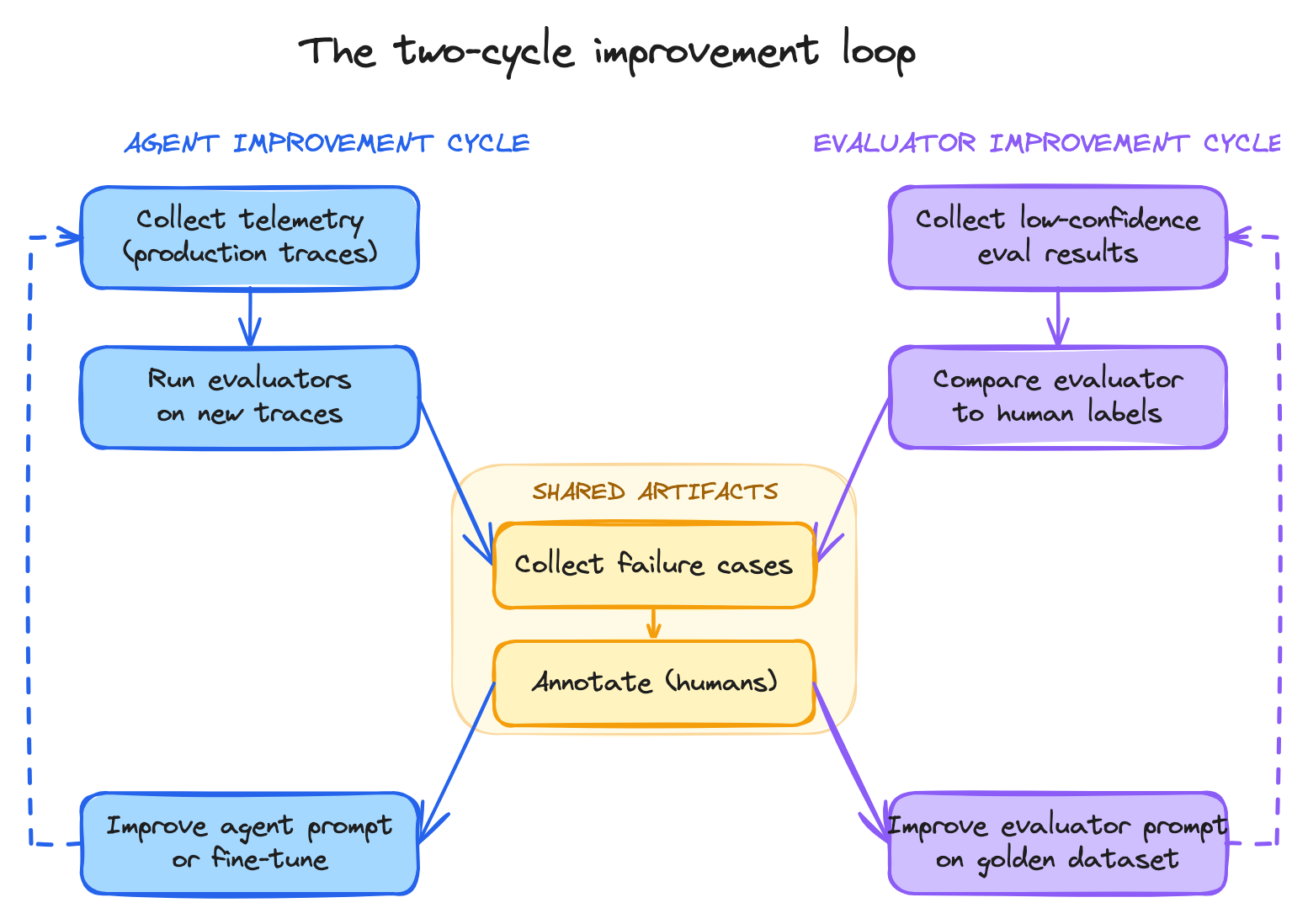
The agent improvement cycle uses evaluators to find bad responses, gather them into a golden dataset, and feed that back into prompts or fine-tuning. The evaluator improvement cycle uses *human ground-truth labels* on those same failure cases to validate whether the evaluator itself is doing a good job — and to refine it when it isn't.
Both cycles run continuously. Both depend on the same artifacts: failure datasets, golden labels, prompts. The whole rest of this section is a walk through the components that make these two cycles work.
# What's in This Section
The rest of the pages in this section are a conceptual reference. They explain the **why** and **what** of every kind of evaluator Arize AX supports, the design decisions you'll face along the way, and the cycles that keep evaluators improving over time. For step-by-step setup of evaluators in the UI, see [Evaluate](/ax/evaluate).
Each page forward-links to the next. If you haven't already read the [OpenTelemetry and OpenInference](/ax/concepts/otel-openinference/overview) concepts section, the language of spans, traces, sessions, and attributes is assumed throughout this section.
***
## Next step
Evaluators have a scope. The first design decision is what scope answers the question you care about: