> ## Documentation Index
> Fetch the complete documentation index at: https://arize-ax.mintlify.site/docs/llms.txt
> Use this file to discover all available pages before exploring further.
# Loading Prompts in Your Application
> How prompts move from the Hub into your application — the SDK fetch pattern and the local-cache-fallback strategy that keeps the Hub off the inference hot path.
The Hub stores prompts; your application has to read them. The naive approach — fetch from the Hub on every inference call — is the wrong default. This page explains why, what to do instead, and the conceptual shape of the SDK fetch.
# Two access patterns
| Pattern | When to use |
| :------------------------------------------------------------- | :---------------------------------------------------------------------------------------------------------------------------- |
| **Fetch by name + tag** (e.g., `support-agent` / `production`) | The common case. Your application asks for "the production version" and the Hub returns whatever the tag currently points at. |
| **Fetch by name + version hash** | Pinning to a specific version — useful for experiments, reproducibility, and rollouts that must not auto-track tag moves. |
Most applications use the tag-based pattern in steady state. The version-hash pattern shows up in tests, CI runs, and during a controlled rollout when you don't want a tag move to silently change behavior.
# Why not fetch from the Hub in the inference path
Calling the Hub directly inside your inference handler is a reliability anti-pattern:
* **Latency.** A network hop to the Hub adds tens to hundreds of milliseconds to every request.
* **Availability coupling.** If the Hub is unreachable for any reason — network blip, maintenance window, regional outage — your application stops serving inferences. Your runtime now depends on the Hub being up to serve.
* **Rate and cost pressure.** Every inference call becomes a Hub API call. At even moderate volume that's a lot of traffic against a service that doesn't need to be called per request.
The right shape is to fetch the Hub on a refresh cadence — not per request — and cache the result locally.
# The local-cache-fallback pattern
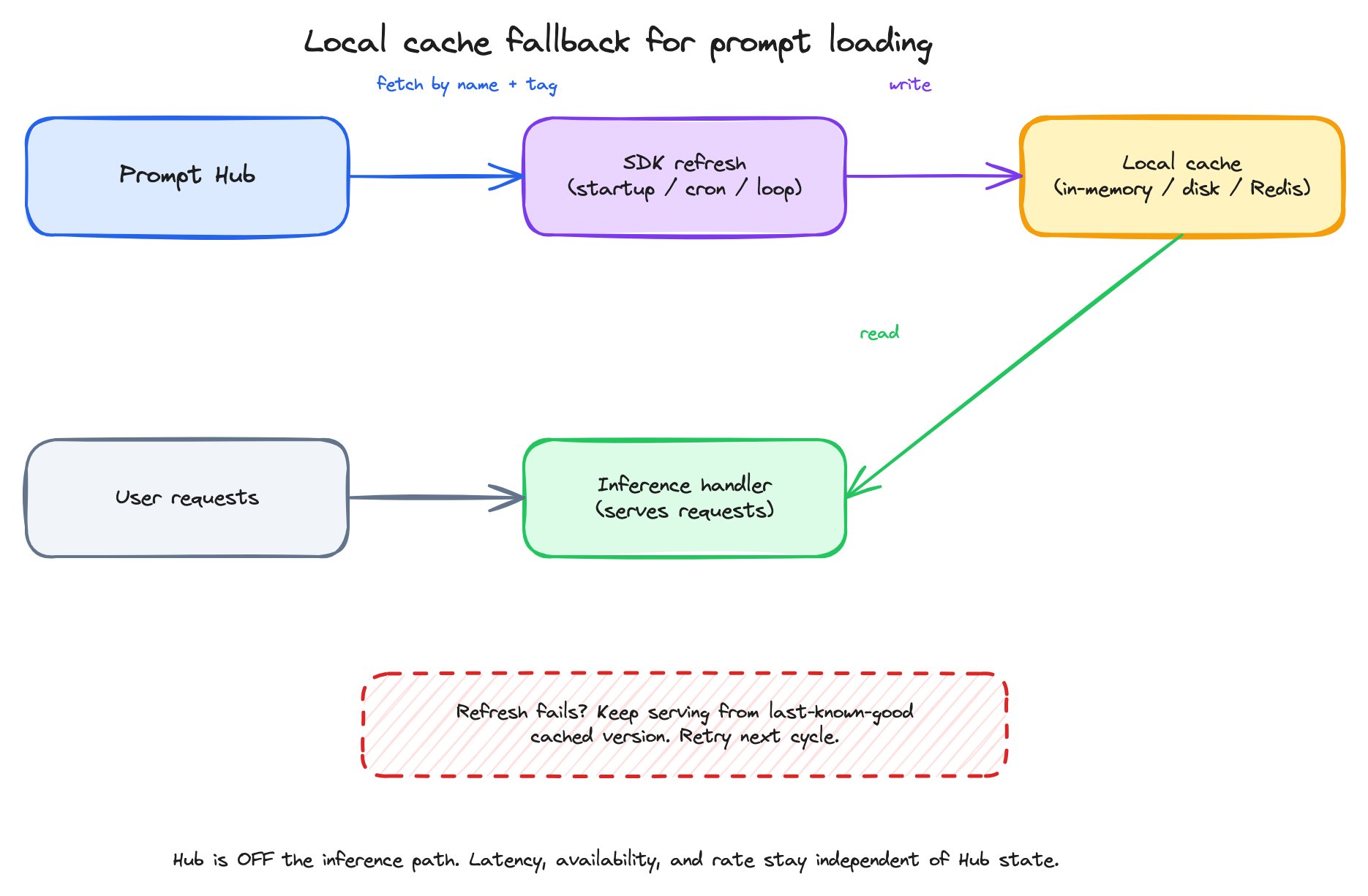 The pattern in words:
1. On a refresh cadence — application startup, a periodic cron, a background loop — fetch the prompt you need by name + tag.
2. Write the fetched Prompt Object to a local cache. The cache lives in memory, on disk, or in a shared store like Redis, depending on your deployment.
3. Inference reads only from the cache. The Hub is not in the request path.
4. If a refresh fails (network error, Hub unreachable), keep serving from the **last-known-good** cached version. The next successful refresh updates the cache.
5. On a successful refresh, if the fetched version differs from the cached one, log the change. You want to know when a tag move took effect.
This is the **Local Cache Fallback** strategy. It's documented in detail in the SDK reference — see [Local Cache Fallback](/api-clients/python/version-7/prompt-hub-api#local-cache-fallback) — and it's the recommended pattern for any production application reading prompts from the Hub.
# The shape of an SDK fetch
Conceptually, fetching a prompt looks the same across every SDK. In Python:
```python theme={null}
# Approximate shape — see the Python Prompts API for full options
prompt = client.prompts.get(prompt="support-agent", label="production")
version = prompt.version # the immutable Prompt Object snapshot
# Apply runtime variables to the template's {placeholders}
rendered_messages = [
{"role": m.role, "content": m.content.format(customer_input=user_input, order_id=order)}
for m in version.messages
]
# Invoke the LLM with everything the Prompt Object carries
response = invoke_llm(
messages=rendered_messages,
model=version.model,
temperature=version.invocation_params.temperature,
max_tokens=version.invocation_params.max_tokens,
response_format=version.invocation_params.response_format,
tools=version.invocation_params.tool_config,
)
```
Three things to notice:
* **`get(prompt, label=...)`** returns the whole Prompt Object — template, model, invocation parameters, tools, response format — bundled into a `PromptWithVersion` whose `.version` holds the snapshot. You don't fetch each part separately.
* **Variables are applied to the template yourself** — Python f-string-style `.format(**values)` on each message's `content`. The SDK doesn't render messages for you, but the templating is a single-line idiom.
* **The model is part of what you fetched.** If a tag move swapped the model from `gpt-5.4` to `gpt-5.4-mini`, your code picks up the new model on the next refresh without code changes.
For exact SDK signatures see the language-specific clients:
* [Python Prompts API](/api-clients/python/version-8/client-resources/prompts)
* [TypeScript Prompts API](/api-clients/typescript/version-1/client-resources/prompts)
* [Go Prompts API](/api-clients/go/version-2/client-resources/prompts)
* [CLI `ax prompts`](/api-clients/cli/prompts)
# What this gives your application
* **Decoupled prompt deploys.** Promote a new prompt by moving the `production` tag in the Hub. No code redeploy.
* **Resilience to Hub blips.** Cached prompts keep serving while a refresh retries.
* **Observable rollouts.** Refresh logs make tag moves visible to your application's operators.
* **Pin-when-you-need-to.** Tests can pin to a version hash to assert behavior; production reads the tag.
***
## Next step
Prompts move from the Hub into your application. Where do they get iterated on in the first place? The Playground.
The pattern in words:
1. On a refresh cadence — application startup, a periodic cron, a background loop — fetch the prompt you need by name + tag.
2. Write the fetched Prompt Object to a local cache. The cache lives in memory, on disk, or in a shared store like Redis, depending on your deployment.
3. Inference reads only from the cache. The Hub is not in the request path.
4. If a refresh fails (network error, Hub unreachable), keep serving from the **last-known-good** cached version. The next successful refresh updates the cache.
5. On a successful refresh, if the fetched version differs from the cached one, log the change. You want to know when a tag move took effect.
This is the **Local Cache Fallback** strategy. It's documented in detail in the SDK reference — see [Local Cache Fallback](/api-clients/python/version-7/prompt-hub-api#local-cache-fallback) — and it's the recommended pattern for any production application reading prompts from the Hub.
# The shape of an SDK fetch
Conceptually, fetching a prompt looks the same across every SDK. In Python:
```python theme={null}
# Approximate shape — see the Python Prompts API for full options
prompt = client.prompts.get(prompt="support-agent", label="production")
version = prompt.version # the immutable Prompt Object snapshot
# Apply runtime variables to the template's {placeholders}
rendered_messages = [
{"role": m.role, "content": m.content.format(customer_input=user_input, order_id=order)}
for m in version.messages
]
# Invoke the LLM with everything the Prompt Object carries
response = invoke_llm(
messages=rendered_messages,
model=version.model,
temperature=version.invocation_params.temperature,
max_tokens=version.invocation_params.max_tokens,
response_format=version.invocation_params.response_format,
tools=version.invocation_params.tool_config,
)
```
Three things to notice:
* **`get(prompt, label=...)`** returns the whole Prompt Object — template, model, invocation parameters, tools, response format — bundled into a `PromptWithVersion` whose `.version` holds the snapshot. You don't fetch each part separately.
* **Variables are applied to the template yourself** — Python f-string-style `.format(**values)` on each message's `content`. The SDK doesn't render messages for you, but the templating is a single-line idiom.
* **The model is part of what you fetched.** If a tag move swapped the model from `gpt-5.4` to `gpt-5.4-mini`, your code picks up the new model on the next refresh without code changes.
For exact SDK signatures see the language-specific clients:
* [Python Prompts API](/api-clients/python/version-8/client-resources/prompts)
* [TypeScript Prompts API](/api-clients/typescript/version-1/client-resources/prompts)
* [Go Prompts API](/api-clients/go/version-2/client-resources/prompts)
* [CLI `ax prompts`](/api-clients/cli/prompts)
# What this gives your application
* **Decoupled prompt deploys.** Promote a new prompt by moving the `production` tag in the Hub. No code redeploy.
* **Resilience to Hub blips.** Cached prompts keep serving while a refresh retries.
* **Observable rollouts.** Refresh logs make tag moves visible to your application's operators.
* **Pin-when-you-need-to.** Tests can pin to a version hash to assert behavior; production reads the tag.
***
## Next step
Prompts move from the Hub into your application. Where do they get iterated on in the first place? The Playground.