> ## Documentation Index
> Fetch the complete documentation index at: https://arize-ax.mintlify.site/docs/llms.txt
> Use this file to discover all available pages before exploring further.
# Prompts in Arize AX
> Why prompts are engineering artifacts, the iteration cycle they live inside, and how this section is organized.
A model is what runs your application. A **prompt** is how you control it. Treat the prompt as a string in a config file and you'll lose track of which version shipped, why someone changed it, and whether the change made things better or worse. Treat the prompt as an engineering artifact — versioned, tagged, diffed, deployed — and you can iterate on AI behavior with the same rigor you'd apply to code.
This section is the conceptual on-ramp for prompt management in Arize AX. It covers what a prompt *is* in Arize AX (more than a string), how the platform handles versioning and tagging, how prompts move from the Hub into your application, how you iterate on them in the Playground against datasets and evaluators, how the same workflow integrates with CI/CD, and how the three optimization paths fit together.
# Why prompts deserve engineering rigor
Most teams start with prompts as throwaway strings — pasted into Slack, embedded in code, copied between notebooks. That works until any of these become true:
| Failure mode | What it looks like |
| :---------------------------- | :------------------------------------------------------------------------------------------------------------------------- |
| **Lost provenance** | Production is running a prompt nobody can find the source of. |
| **Silent regressions** | Someone tweaked the prompt; quality dropped; nobody caught it. |
| **No rollback** | A bad prompt shipped and you can't restore the previous one because you don't have it. |
| **Drift across environments** | Dev, staging, and prod are running three different prompts and nobody is sure why. |
| **Untested model swaps** | The model provider released a new version; the same prompt now behaves differently and you don't have a way to measure it. |
None of these surface as code errors. The application still returns a 200, the trace looks fine, and the user gets a worse answer. Treating prompts as engineering artifacts is how you prevent this class of failure.
What rigor unlocks, once it's in place:
* **Safe iteration.** Change a prompt, see the score delta on real data, then promote or roll back.
* **Reproducibility.** Every past version is recoverable. Bug reports against `prod-v1.2` are answerable.
* **Deploy without redeploy.** Move a tag in the Hub instead of pushing code to swap the production prompt.
* **Regression detection.** CI catches prompt or model changes that hurt eval scores before they ship.
* **Collaboration.** Subject-matter experts and engineers iterate on the same artifact, not parallel copies.
# The prompt iteration cycle
The whole point of the platform's prompt machinery is to make this cycle fast and safe:
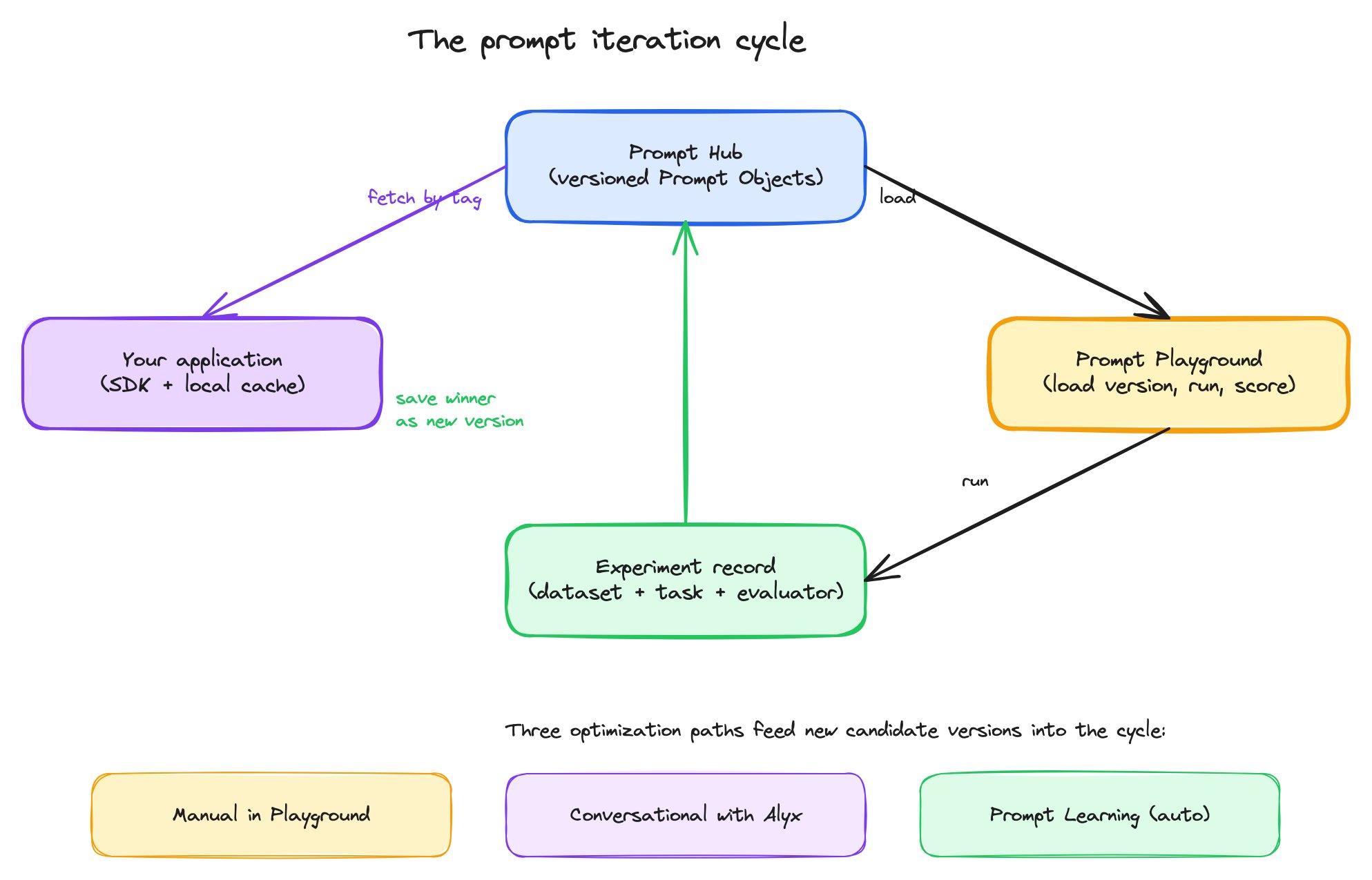 The cycle in words:
1. The **Prompt Hub** stores the current version of every prompt your team owns.
2. The **Playground** loads any version from the Hub and runs it against a dataset, with evaluators attached, so you can measure quality on real data.
3. An **experiment** captures one such run as a comparable record — same dataset, same evaluators, different prompt versions side by side.
4. The winning variant gets **saved back to the Hub** as a new immutable version, optionally tagged (`production`, `staging`, etc.).
5. Your application reads the tagged version via the SDK — no code deploy needed when the prompt changes.
6. **Optimization** — manual edits in the Playground, conversational refinement with Alyx, or fully-automated Prompt Learning — feeds new candidate versions back into the cycle.
# What's in this section
The rest of the pages in this section are a conceptual reference. They explain the **why** and **what** of how prompts work in Arize AX, the design decisions you'll face, and the workflow the platform is shaped around. For step-by-step UI walkthroughs of any specific surface, see [Improve](/ax/improve/build-a-prompt).
***
## Next step
The first thing to understand is what Arize AX considers a prompt — it's more than a string.
The cycle in words:
1. The **Prompt Hub** stores the current version of every prompt your team owns.
2. The **Playground** loads any version from the Hub and runs it against a dataset, with evaluators attached, so you can measure quality on real data.
3. An **experiment** captures one such run as a comparable record — same dataset, same evaluators, different prompt versions side by side.
4. The winning variant gets **saved back to the Hub** as a new immutable version, optionally tagged (`production`, `staging`, etc.).
5. Your application reads the tagged version via the SDK — no code deploy needed when the prompt changes.
6. **Optimization** — manual edits in the Playground, conversational refinement with Alyx, or fully-automated Prompt Learning — feeds new candidate versions back into the cycle.
# What's in this section
The rest of the pages in this section are a conceptual reference. They explain the **why** and **what** of how prompts work in Arize AX, the design decisions you'll face, and the workflow the platform is shaped around. For step-by-step UI walkthroughs of any specific surface, see [Improve](/ax/improve/build-a-prompt).
***
## Next step
The first thing to understand is what Arize AX considers a prompt — it's more than a string.