> ## Documentation Index
> Fetch the complete documentation index at: https://arize-ax.mintlify.site/docs/llms.txt
> Use this file to discover all available pages before exploring further.
# Tracing AI Coding Agents
> Capture sessions, turns, model calls, and tool usage from Claude Code, Cursor, Codex, and other AI coding agents in Arize AX.
AI coding agents like Claude Code, Cursor, and Codex run as autonomous loops in your terminal and IDE: they read your prompt, call the model, run tools, and iterate. The [Arize Coding Harness Tracing](https://github.com/Arize-ai/coding-harness-tracing) instruments these agents and streams [OpenInference](https://github.com/Arize-ai/openinference) traces to Arize AX, so you can see exactly what your coding agents are doing, how much they cost, and where they get stuck.
This guide walks through setting up tracing for any supported coding agent. No application code changes are required — the toolkit hooks into each agent's own extension points.
We'll go through the following steps:
## High Level Concepts
A coding agent (or "harness") wraps a model in a loop that submits prompts, calls tools, and reacts to the results. The Coding Harness Tracing toolkit registers hooks in each agent's own configuration. When a hook fires — a session starts, a prompt is submitted, a tool runs — a small adapter builds OpenInference spans and exports them to Arize AX. There is no background service to manage, and tracing fails open: if the adapter errors, your agent keeps running.
The toolkit supports these coding agents:
| Coding agent | Setup guide |
| :------------------------------ | :-------------------------------------------------------------------------------- |
| Claude Code (CLI and Agent SDK) | [Claude Code tracing](/ax/integrations/platforms/claude-code/claude-code-tracing) |
| OpenAI Codex | [Codex tracing](/ax/integrations/platforms/codex/codex-tracing) |
| Cursor (IDE and CLI) | [Cursor tracing](/ax/integrations/platforms/cursor/cursor-tracing) |
| GitHub Copilot | [Copilot tracing](/ax/integrations/platforms/copilot/copilot-tracing) |
| Gemini CLI | [Gemini CLI tracing](/ax/integrations/platforms/gemini/gemini-tracing) |
| Kiro | [Kiro tracing](/ax/integrations/platforms/kiro/kiro-tracing) |
| OpenCode | [OpenCode tracing](/ax/integrations/platforms/opencode/opencode-tracing) |
Regardless of which agent you use, the captured spans follow the same OpenInference shape:
* **Sessions** group every turn from a single coding session.
* **Turn traces** capture one user prompt and the agent's response.
* **LLM spans** record each model call with model name, provider, and token counts.
* **Tool spans** capture each tool invocation — shell commands, file edits, MCP calls — with inputs, outputs, and duration.
## Set up Arize AX
Sign up for a free [Arize AX account](https://app.arize.com/auth/join), then grab the two credentials you'll need:
1. Log in at [app.arize.com](https://app.arize.com).
2. Click **Settings** and copy your **Space ID**.
3. Open the **API Keys** tab and create or copy an **API key**.
The installer in the next step prompts you for these and stores them for you.
## Install tracing for your agent
Every agent installs the same way — run the installer with your agent's key. It detects the agent, prompts for your Arize AX credentials and project name, writes them to `~/.arize/harness/config.json`, and registers the hooks in the agent's config.
```bash theme={null}
# Replace `claude` with your agent: codex, cursor, copilot, gemini, kiro, or opencode
curl -sSL https://raw.githubusercontent.com/Arize-ai/coding-harness-tracing/main/install.sh | bash -s -- claude
```
```powershell theme={null}
iwr -useb https://raw.githubusercontent.com/Arize-ai/coding-harness-tracing/main/install.bat -OutFile $env:TEMP\install.bat
& $env:TEMP\install.bat claude
```
Claude Code can also be installed as a [Claude Code plugin](/ax/integrations/platforms/claude-code/claude-code-tracing#install) from the marketplace. For agent-specific install paths and configuration files, follow the [setup guide](#high-level-concepts) for your agent.
## Run your agent and observe
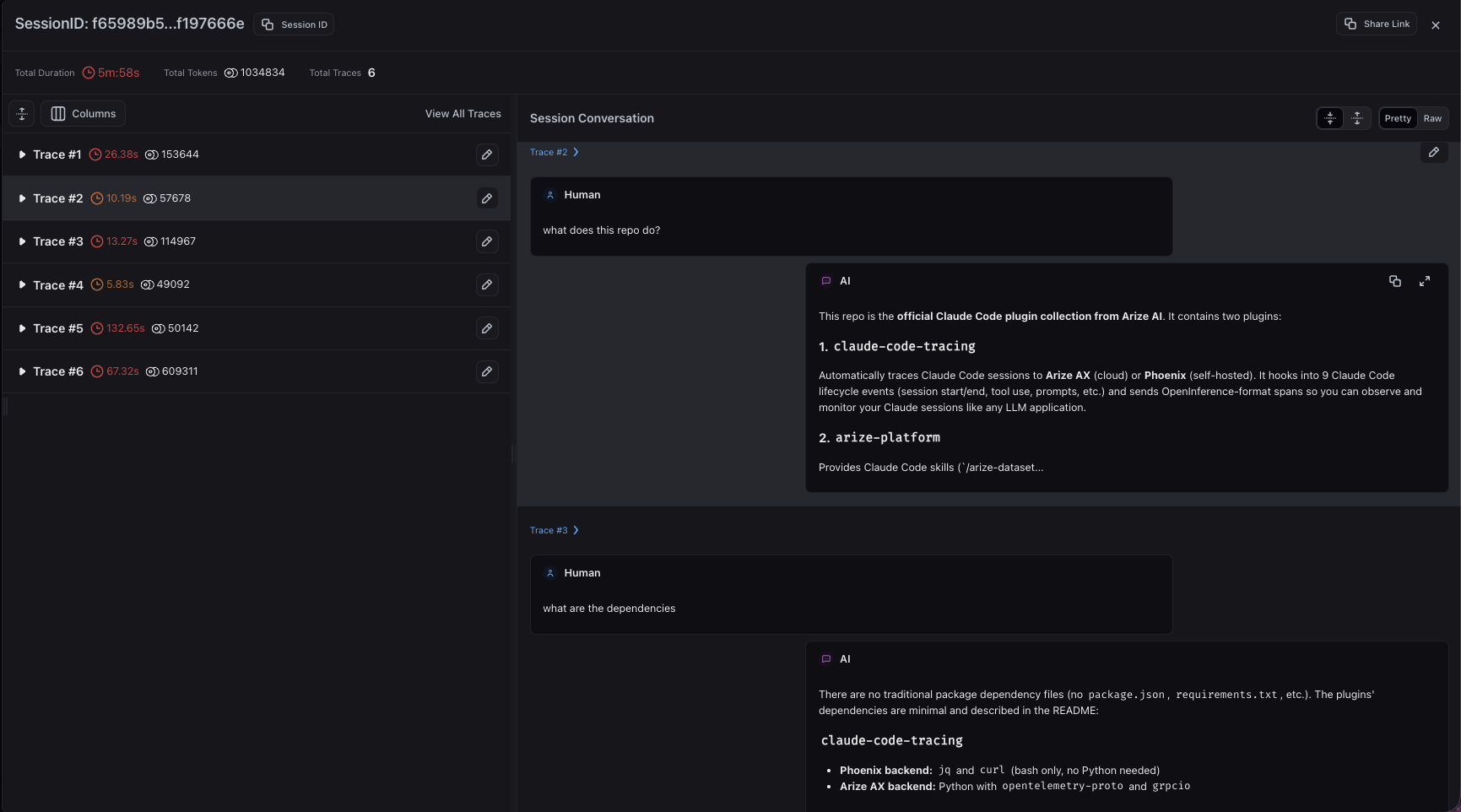
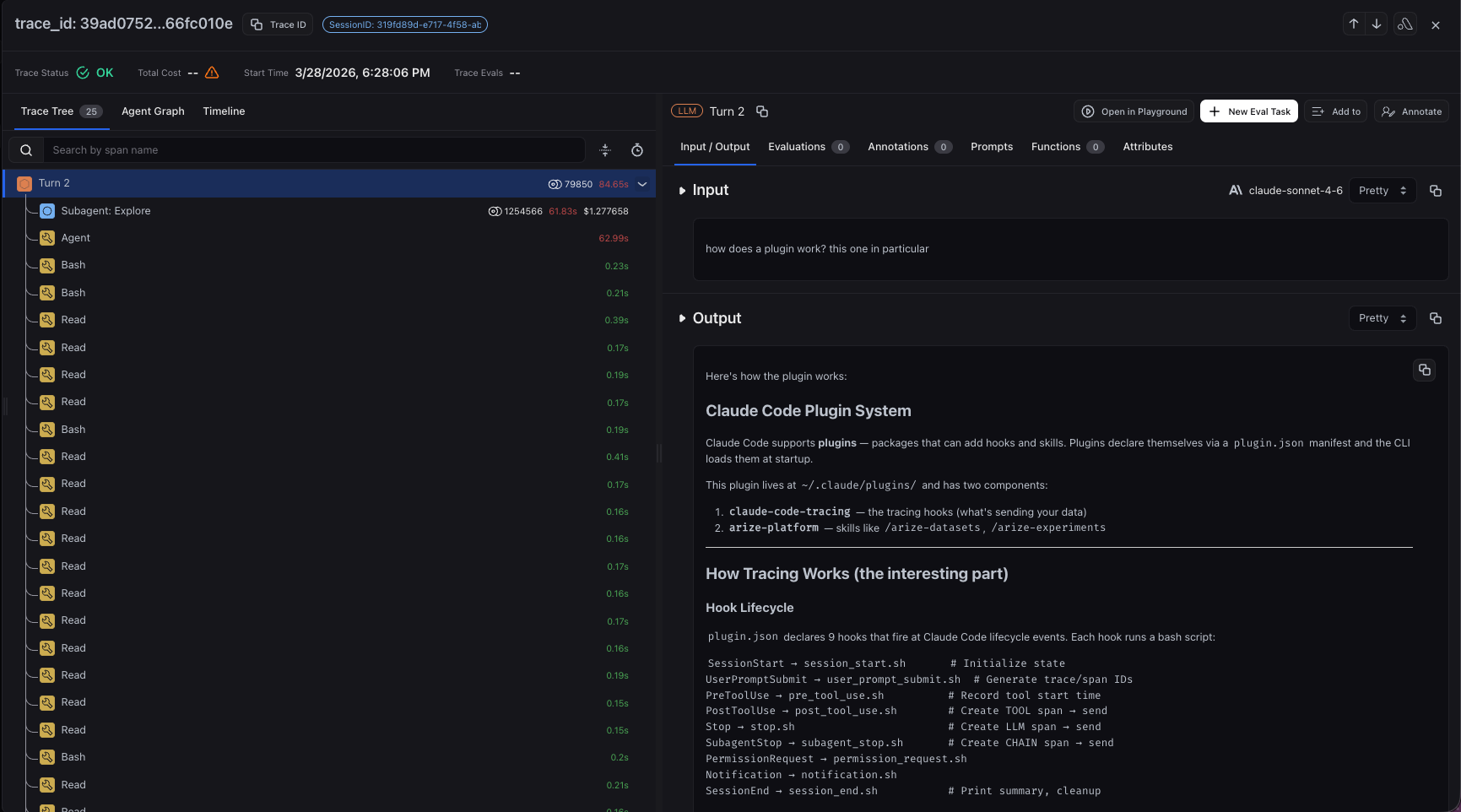
Start your coding agent the way you normally would and complete a few turns. Traces stream to your configured project in Arize AX, grouped by session. You'll see each turn as a trace, with nested spans for the model's response, every tool call, and any subagents the coding agent spawns.
 Drill into any turn to inspect the full span tree, including model generations, tool inputs and outputs, and token costs.
 If you don't see traces, tail the log at `~/.arize/harness/logs/.log`, or set `ARIZE_VERBOSE=true` before launching the agent to see routine tracing activity.
## Control what gets captured
All agents share a common set of environment variables. Set them in your shell profile, or for Claude Code in the `env` block of `~/.claude/settings.json`. Environment variables take precedence over `~/.arize/harness/config.json`.
**Toggle tracing without uninstalling:**
```bash theme={null}
export ARIZE_TRACE_ENABLED="false" # disable hooks; set to "true" to re-enable
export ARIZE_DRY_RUN="true" # build spans but don't send them (useful for testing)
```
**Redact sensitive content** — each flag defaults to `"true"`; set to `"false"` to opt out per category:
| Flag | Redacts |
| :----------------------- | :-------------------------------------- |
| `ARIZE_LOG_PROMPTS` | User prompt and assistant response text |
| `ARIZE_LOG_TOOL_DETAILS` | Tool names and arguments |
| `ARIZE_LOG_TOOL_CONTENT` | Tool call output content |
**Attribute sessions to a user or add custom span attributes** — set `ARIZE_USER_ID`, or add an `attributes` map in `~/.arize/harness/config.json` to tag every span (for example with `team` or `environment`):
```json theme={null}
{
"attributes": {
"team": "payments",
"environment": "prod"
}
}
```
To remove tracing, run the installer with `uninstall` and your agent's key:
```bash theme={null}
curl -sSL https://raw.githubusercontent.com/Arize-ai/coding-harness-tracing/main/install.sh | bash -s -- uninstall claude
```
## Next steps
* Follow the dedicated [setup guide](#high-level-concepts) for your coding agent to see the exact hooks captured and any agent-specific behavior.
* Browse all [tracing integrations](/ax/cookbooks/tracing-integrations) to instrument the rest of your stack.
* Once traces are flowing, [evaluate your agent](/ax/cookbooks/evaluate/overview) to measure quality and catch regressions.
## Resources
If you don't see traces, tail the log at `~/.arize/harness/logs/.log`, or set `ARIZE_VERBOSE=true` before launching the agent to see routine tracing activity.
## Control what gets captured
All agents share a common set of environment variables. Set them in your shell profile, or for Claude Code in the `env` block of `~/.claude/settings.json`. Environment variables take precedence over `~/.arize/harness/config.json`.
**Toggle tracing without uninstalling:**
```bash theme={null}
export ARIZE_TRACE_ENABLED="false" # disable hooks; set to "true" to re-enable
export ARIZE_DRY_RUN="true" # build spans but don't send them (useful for testing)
```
**Redact sensitive content** — each flag defaults to `"true"`; set to `"false"` to opt out per category:
| Flag | Redacts |
| :----------------------- | :-------------------------------------- |
| `ARIZE_LOG_PROMPTS` | User prompt and assistant response text |
| `ARIZE_LOG_TOOL_DETAILS` | Tool names and arguments |
| `ARIZE_LOG_TOOL_CONTENT` | Tool call output content |
**Attribute sessions to a user or add custom span attributes** — set `ARIZE_USER_ID`, or add an `attributes` map in `~/.arize/harness/config.json` to tag every span (for example with `team` or `environment`):
```json theme={null}
{
"attributes": {
"team": "payments",
"environment": "prod"
}
}
```
To remove tracing, run the installer with `uninstall` and your agent's key:
```bash theme={null}
curl -sSL https://raw.githubusercontent.com/Arize-ai/coding-harness-tracing/main/install.sh | bash -s -- uninstall claude
```
## Next steps
* Follow the dedicated [setup guide](#high-level-concepts) for your coding agent to see the exact hooks captured and any agent-specific behavior.
* Browse all [tracing integrations](/ax/cookbooks/tracing-integrations) to instrument the rest of your stack.
* Once traces are flowing, [evaluate your agent](/ax/cookbooks/evaluate/overview) to measure quality and catch regressions.
## Resources