> ## Documentation Index
> Fetch the complete documentation index at: https://arize-ax.mintlify.site/docs/llms.txt
> Use this file to discover all available pages before exploring further.
# Experiments
> Test and validate your LLM applications
**Experiments** help systematically test changes in LLM applications using a curated dataset. You can run your inputs through updated prompts or models and assess the outputs using evaluators.
Storing each experiment run independently ensures a reliable record of your work. This makes it easy to compare runs side by side, track progress over time, and validate improvements with confidence.
# Understand Performance Through Experiments
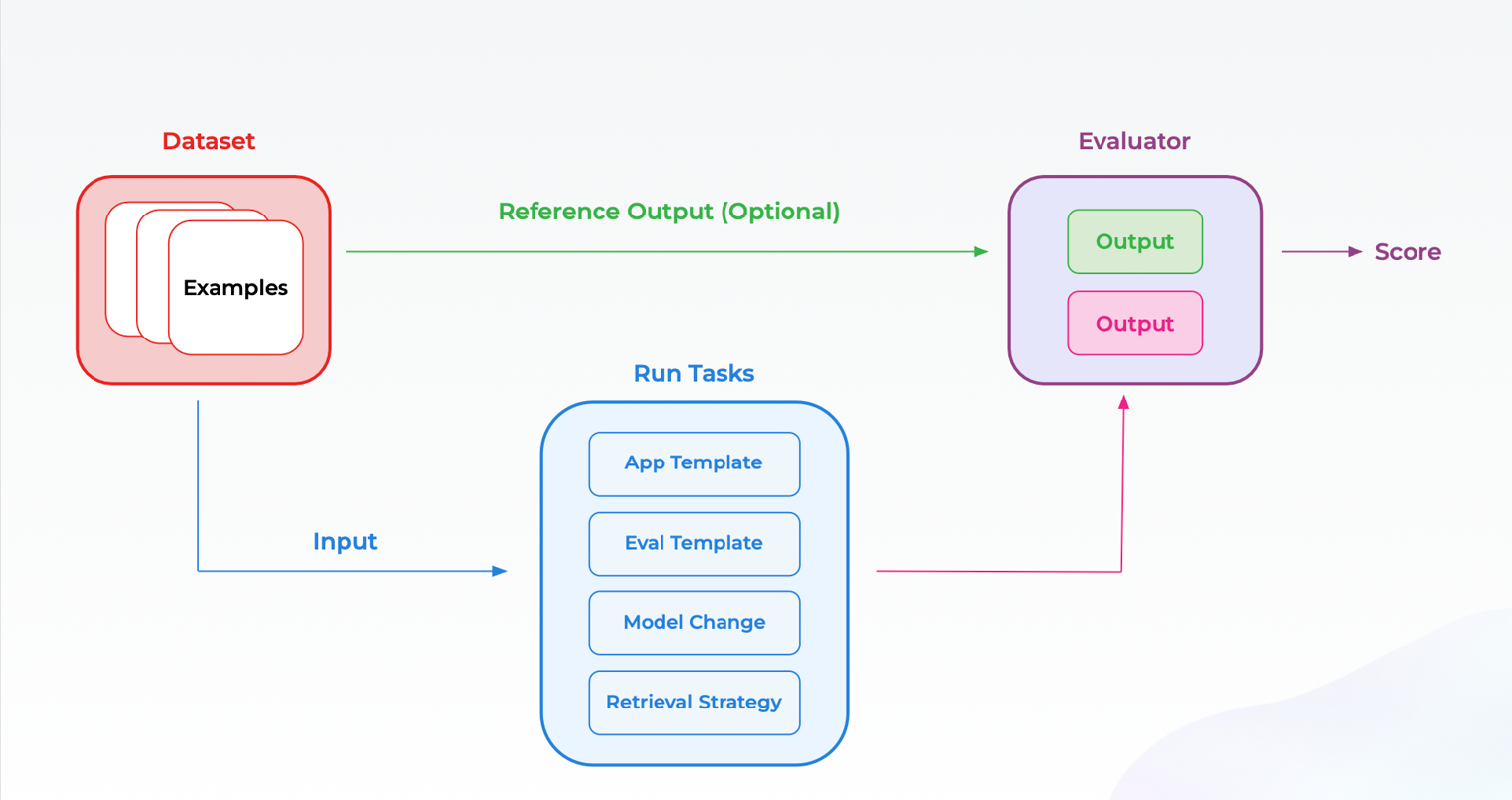
Experiments in Arize AX give you a structured way to measure and improve your LLM application. By combining **datasets, tasks, and evaluators**, you can test on any data and understand performance.
 ## **Datasets**
A dataset in Arize AX is the foundation for reliably testing and evaluating your LLM application. It organizes real-world and edge case examples in a structured format. You can turn any data into a dataset, including sample conversations, logs, synthetic edge cases, and more.
Each example in a dataset can contain input messages, expected outputs, metadata, or any other tabular data you would like to observe and test.
## **Tasks**
A task defines the function you want to run on a dataset. Simply put, it takes an input from your dataset and produces an output.
The task function typically mirrors LLM behavior such as generating outputs, classifying inputs, or editing text. Defining tasks let you systematically measure how your application performs across various examples in your dataset.
## **Evaluators**
An evaluator is a function that takes the input and output of a task and provides an assessment. This serves as the measure of success for your experiment. You can define multiple evaluators, from LLM-based judges to code-based checks, to capture different metrics.
In Arize, evaluators can be set up and run in the UI or defined in code. Progress is tracked with charts that show how evaluator scores change over time. [Experiment Comparison](/ax/develop/datasets-and-experiments/compare-experiments) features also make it easy to see evaluator scores side-by-side to identify improvements or regressions across the dataset. For classification tasks, you can also compute [binary classification metrics](/ax/develop/datasets-and-experiments/experiment-classification-metrics) like F1, Accuracy, Precision, and Recall without writing evaluator code.
## Learn More
Create your first experiment
Understand where to deploy different kinds of evals
Explore end-to-end walkthroughs for running experiments
## **Datasets**
A dataset in Arize AX is the foundation for reliably testing and evaluating your LLM application. It organizes real-world and edge case examples in a structured format. You can turn any data into a dataset, including sample conversations, logs, synthetic edge cases, and more.
Each example in a dataset can contain input messages, expected outputs, metadata, or any other tabular data you would like to observe and test.
## **Tasks**
A task defines the function you want to run on a dataset. Simply put, it takes an input from your dataset and produces an output.
The task function typically mirrors LLM behavior such as generating outputs, classifying inputs, or editing text. Defining tasks let you systematically measure how your application performs across various examples in your dataset.
## **Evaluators**
An evaluator is a function that takes the input and output of a task and provides an assessment. This serves as the measure of success for your experiment. You can define multiple evaluators, from LLM-based judges to code-based checks, to capture different metrics.
In Arize, evaluators can be set up and run in the UI or defined in code. Progress is tracked with charts that show how evaluator scores change over time. [Experiment Comparison](/ax/develop/datasets-and-experiments/compare-experiments) features also make it easy to see evaluator scores side-by-side to identify improvements or regressions across the dataset. For classification tasks, you can also compute [binary classification metrics](/ax/develop/datasets-and-experiments/experiment-classification-metrics) like F1, Accuracy, Precision, and Recall without writing evaluator code.
## Learn More
Create your first experiment
Understand where to deploy different kinds of evals
Explore end-to-end walkthroughs for running experiments