> ## Documentation Index
> Fetch the complete documentation index at: https://arize-ax.mintlify.site/docs/llms.txt
> Use this file to discover all available pages before exploring further.
# Optimize a prompt
> Align prompts with your eval criteria using Prompt Learning - UI, SDK, Alyx, or Skills.
 ## What is prompt optimization?
**Prompt Learning** is Arize AX's automated prompt-optimization path — an LLM reads your current prompt, evaluation feedback, and examples, then proposes a revised prompt that better matches your criteria. Same engine, exposed through the UI, SDK, Alyx, and Skills.
For the conceptual frame — including how Prompt Learning compares to manual iteration and conversational refinement with Alyx — see [Optimizing prompts](/ax/concepts/prompts/optimizing-prompts).
## Workflow
Use the [Arize skills plugin](/ax/set-up-with-ai-assistants) with the [`arize-prompt-optimization`](https://github.com/Arize-ai/arize-skills/tree/main/skills/arize-prompt-optimization) skill to optimize prompts from traces and experiments via the `ax` CLI. Try asking your agent:
* "Optimize this classifier prompt using the last week of eval feedback."
* "Revise my support prompt to reduce verbosity while keeping escalation rules."
## What is prompt optimization?
**Prompt Learning** is Arize AX's automated prompt-optimization path — an LLM reads your current prompt, evaluation feedback, and examples, then proposes a revised prompt that better matches your criteria. Same engine, exposed through the UI, SDK, Alyx, and Skills.
For the conceptual frame — including how Prompt Learning compares to manual iteration and conversational refinement with Alyx — see [Optimizing prompts](/ax/concepts/prompts/optimizing-prompts).
## Workflow
Use the [Arize skills plugin](/ax/set-up-with-ai-assistants) with the [`arize-prompt-optimization`](https://github.com/Arize-ai/arize-skills/tree/main/skills/arize-prompt-optimization) skill to optimize prompts from traces and experiments via the `ax` CLI. Try asking your agent:
* "Optimize this classifier prompt using the last week of eval feedback."
* "Revise my support prompt to reduce verbosity while keeping escalation rules."
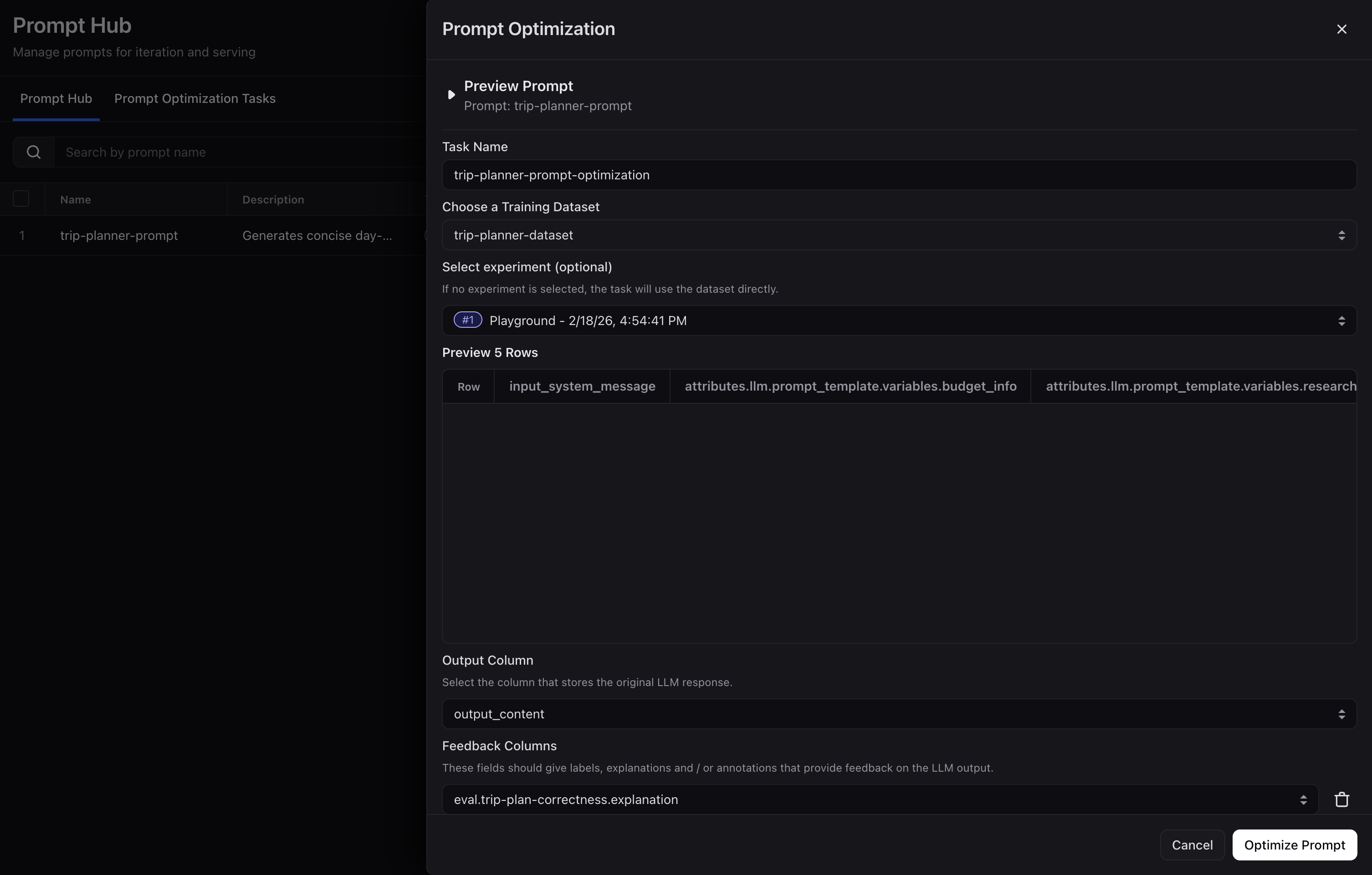
 Tell Alyx what to fix, for example "Optimize my prompt to reduce verbosity" or "Rewrite this to improve formatting consistency."
Ask for further adjustments until the result matches what you want.
Review the changes in the **Playground** and save any version you are happy with to **Prompt Hub**.
Tell Alyx what to fix, for example "Optimize my prompt to reduce verbosity" or "Rewrite this to improve formatting consistency."
Ask for further adjustments until the result matches what you want.
Review the changes in the **Playground** and save any version you are happy with to **Prompt Hub**.
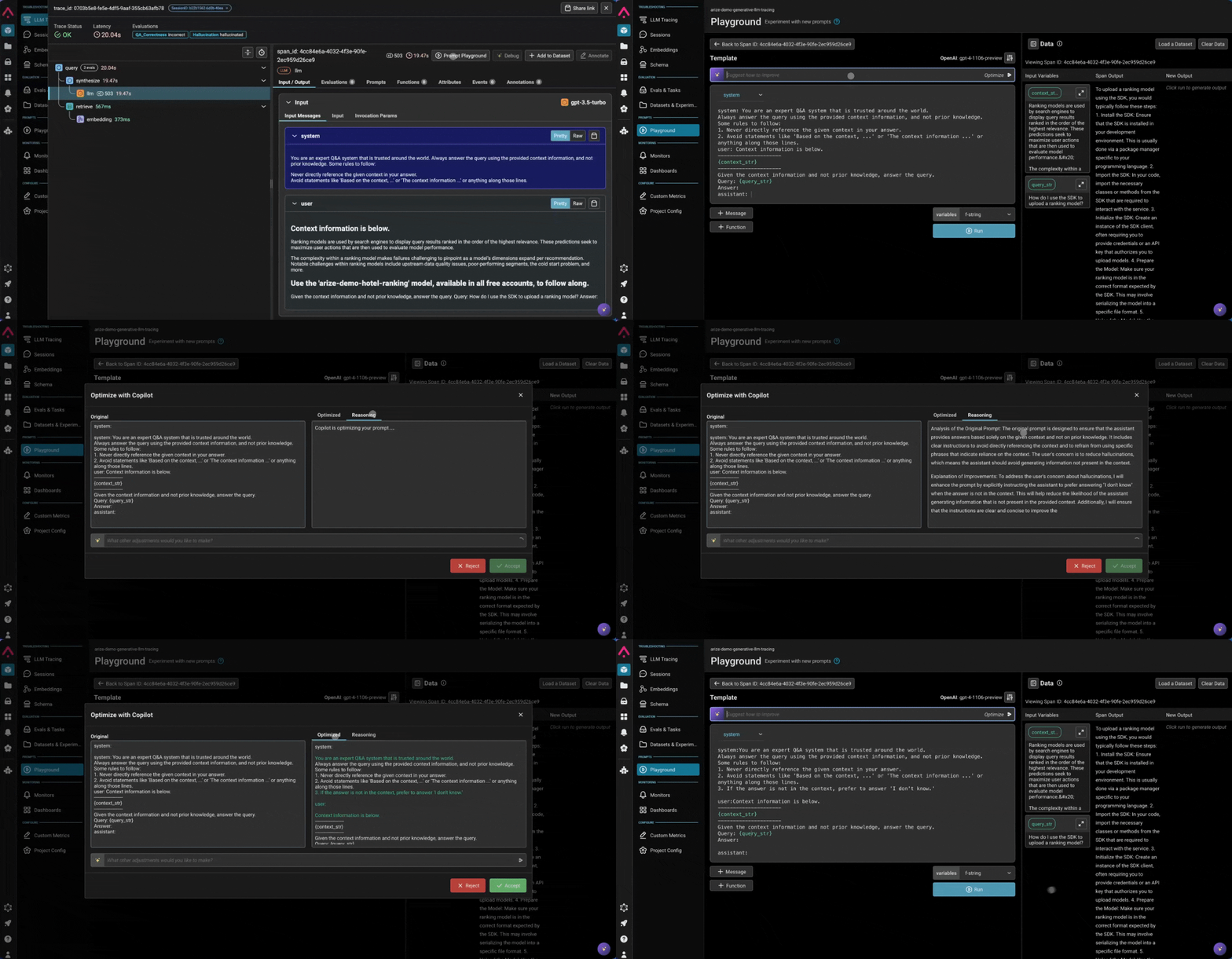 Navigate to **Prompt Hub**, find your prompt, and click **Optimize**.
Enter a task name, then select the training dataset whose rows map to your prompt variables.
Select the experiment whose evaluation feedback will guide the optimizer.
Choose the column that contains the model output you want the optimizer to improve.
Confirm feedback columns. [Evaluator](/ax/evaluate/evaluators) results are auto-populated. **Labels paired with explanations** outperform binary labels alone.
Choose the model that reasons over your examples and feedback to propose prompt updates.
Monitor in **Task Logs**, compare versions in **Prompt Hub**, validate in the **Playground**, then tag the winner as **Production**.
Navigate to **Prompt Hub**, find your prompt, and click **Optimize**.
Enter a task name, then select the training dataset whose rows map to your prompt variables.
Select the experiment whose evaluation feedback will guide the optimizer.
Choose the column that contains the model output you want the optimizer to improve.
Confirm feedback columns. [Evaluator](/ax/evaluate/evaluators) results are auto-populated. **Labels paired with explanations** outperform binary labels alone.
Choose the model that reasons over your examples and feedback to propose prompt updates.
Monitor in **Task Logs**, compare versions in **Prompt Hub**, validate in the **Playground**, then tag the winner as **Production**.
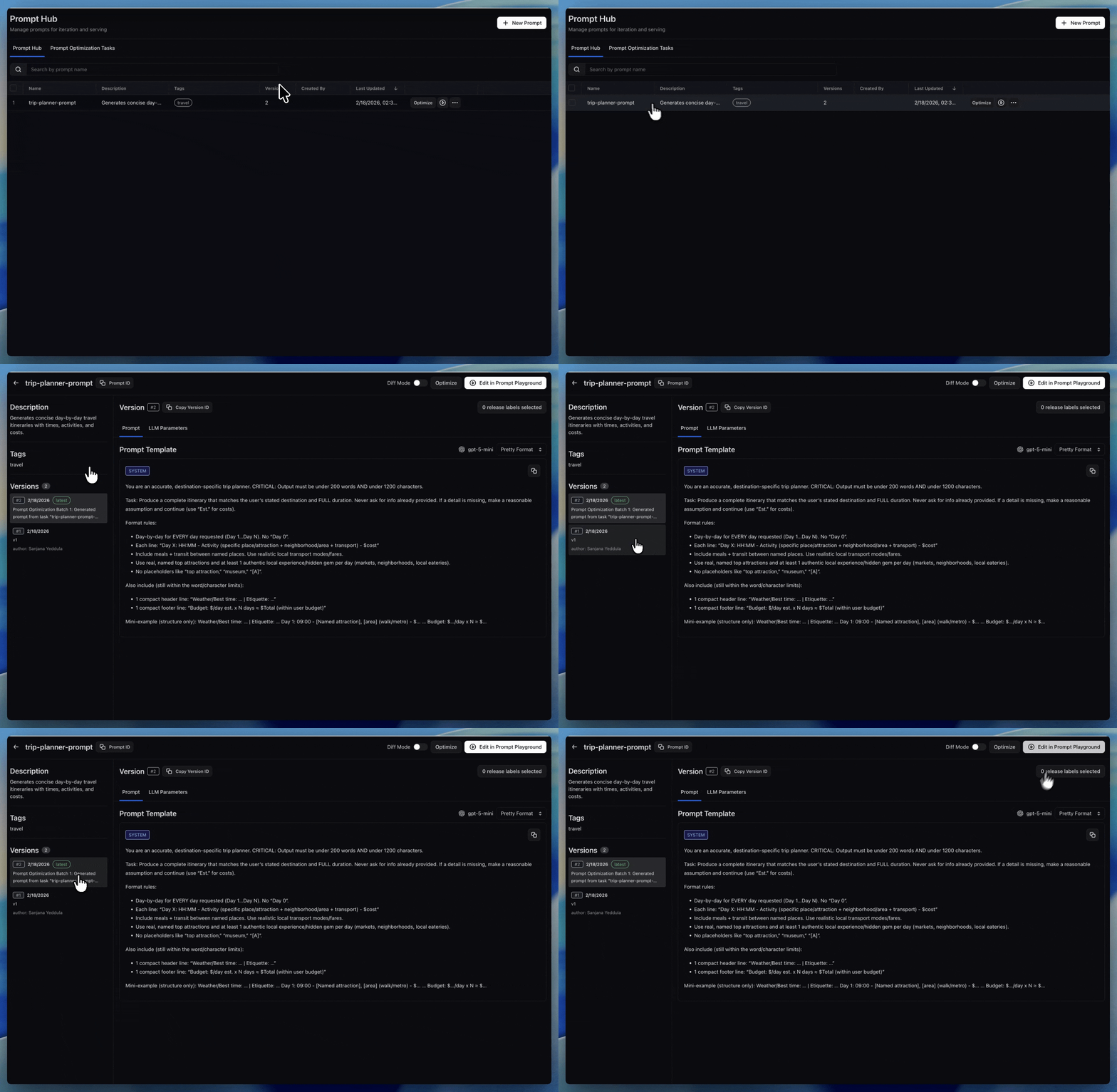 For diffing and labels, see [Save and version prompts](/ax/improve/save-and-version-prompts).
See [compare prompts side by side](/ax/improve/test-a-prompt#multiple-prompts-at-once) for the comparison workflow.
### Prompt Learning via SDK
Automate prompt optimization programmatically using the **Prompt Learning SDK**, which iteratively refines prompts based on evaluation feedback and annotations.
The SDK supports advanced features, like built-in systems to run evaluators, and more flexibility to run multiple loops or define train/test splits.
[Learn more about Prompt Learning via SDK →](/ax/improve/optimize-a-prompt#prompt-learning-via-sdk)
## Next up
When you have versions worth keeping, [**Save and version prompts**](/ax/improve/save-and-version-prompts) in **Prompt Hub** so your team can track changes, experiment on different versions, and measure improvements over time.
For diffing and labels, see [Save and version prompts](/ax/improve/save-and-version-prompts).
See [compare prompts side by side](/ax/improve/test-a-prompt#multiple-prompts-at-once) for the comparison workflow.
### Prompt Learning via SDK
Automate prompt optimization programmatically using the **Prompt Learning SDK**, which iteratively refines prompts based on evaluation feedback and annotations.
The SDK supports advanced features, like built-in systems to run evaluators, and more flexibility to run multiple loops or define train/test splits.
[Learn more about Prompt Learning via SDK →](/ax/improve/optimize-a-prompt#prompt-learning-via-sdk)
## Next up
When you have versions worth keeping, [**Save and version prompts**](/ax/improve/save-and-version-prompts) in **Prompt Hub** so your team can track changes, experiment on different versions, and measure improvements over time.