> ## Documentation Index
> Fetch the complete documentation index at: https://arize-ax.mintlify.site/docs/llms.txt
> Use this file to discover all available pages before exploring further.

# Openinference Semantic Conventions

<Frame>
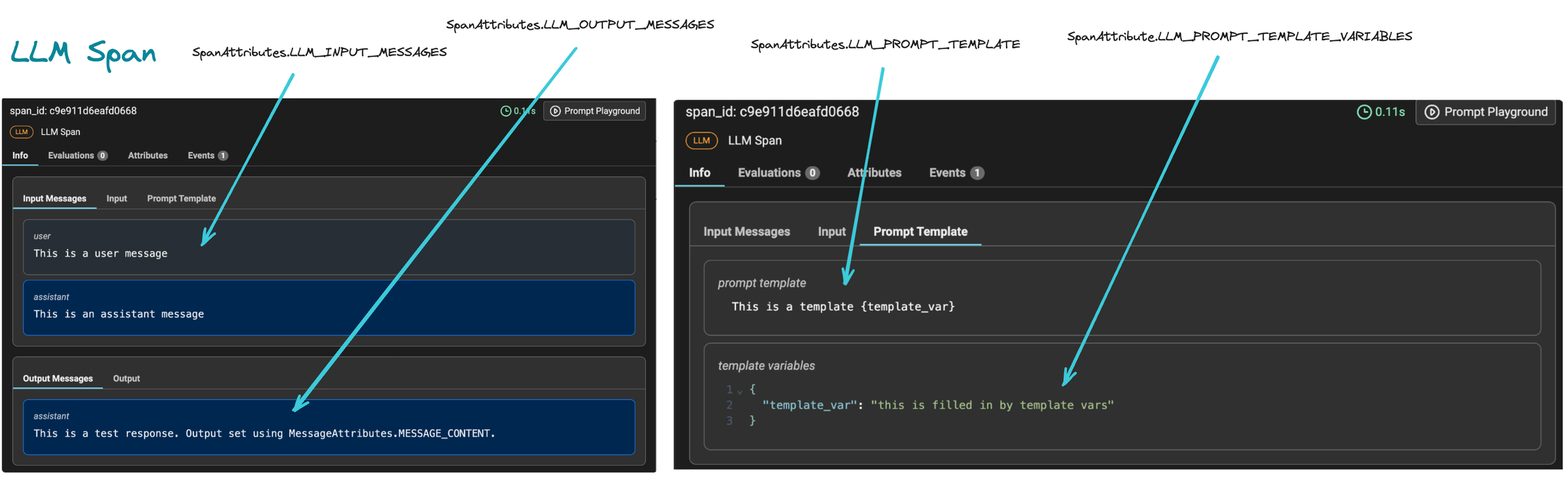
  <img src="https://storage.googleapis.com/arize-phoenix-assets/assets/images/tracing-openinference-semantics.avif" alt="Mapping of attributes to Arize AX" />
</Frame>

<CardGroup cols={1}>
  <Card title="OpenInference Semantic Conventions" href="https://github.com/Arize-ai/openinference/blob/main/spec/semantic_conventions.md" />
</CardGroup>

# Types of Attributes

<Tabs>
  <Tab title="Span">
    ```python theme={null}
    class SpanAttributes:
        OUTPUT_VALUE = "output.value"
        OUTPUT_MIME_TYPE = "output.mime_type"
        """
        The type of output.value. If unspecified, the type is plain text by default.
        If type is JSON, the value is a string representing a JSON object.
        """
        INPUT_VALUE = "input.value"
        INPUT_MIME_TYPE = "input.mime_type"
        """
        The type of input.value. If unspecified, the type is plain text by default.
        If type is JSON, the value is a string representing a JSON object.
        """

        EMBEDDING_EMBEDDINGS = "embedding.embeddings"
        """
        A list of objects containing embedding data, including the vector and represented piece of text.
        """
        EMBEDDING_MODEL_NAME = "embedding.model_name"
        """
        The name of the embedding model.
        """

        LLM_FUNCTION_CALL = "llm.function_call"
        """
        For models and APIs that support function calling. Records attributes such as the function
        name and arguments to the called function.
        """
        LLM_INVOCATION_PARAMETERS = "llm.invocation_parameters"
        """
        Invocation parameters passed to the LLM or API, such as the model name, temperature, etc.
        """
        LLM_INPUT_MESSAGES = "llm.input_messages"
        """
        Messages provided to a chat API.
        """
        LLM_OUTPUT_MESSAGES = "llm.output_messages"
        """
        Messages received from a chat API.
        """
        LLM_MODEL_NAME = "llm.model_name"
        """
        The name of the model being used.
        """
        LLM_PROMPTS = "llm.prompts"
        """
        Prompts provided to a completions API.
        """
        LLM_PROMPT_TEMPLATE = "llm.prompt_template.template"
        """
        The prompt template as a Python f-string.
        """
        LLM_PROMPT_TEMPLATE_VARIABLES = "llm.prompt_template.variables"
        """
        A list of input variables to the prompt template.
        """
        LLM_PROMPT_TEMPLATE_VERSION = "llm.prompt_template.version"
        """
        The version of the prompt template being used.
        """
        LLM_TOKEN_COUNT_PROMPT = "llm.token_count.prompt"
        """
        Number of tokens in the prompt.
        """
        LLM_TOKEN_COUNT_COMPLETION = "llm.token_count.completion"
        """
        Number of tokens in the completion.
        """
        LLM_TOKEN_COUNT_TOTAL = "llm.token_count.total"
        """
        Total number of tokens, including both prompt and completion.
        """

        TOOL_NAME = "tool.name"
        """
        Name of the tool being used.
        """
        TOOL_DESCRIPTION = "tool.description"
        """
        Description of the tool's purpose, typically used to select the tool.
        """
        TOOL_PARAMETERS = "tool.parameters"
        """
        Parameters of the tool represented a dictionary JSON string, e.g.
        see https://platform.openai.com/docs/guides/gpt/function-calling
        """

        RETRIEVAL_DOCUMENTS = "retrieval.documents"

        METADATA = "metadata"
        """
        Metadata attributes are used to store user-defined key-value pairs.
        For example, LangChain uses metadata to store user-defined attributes for a chain.
        """

        TAG_TAGS = "tag.tags"
        """
        Custom categorical tags for the span.
        """

        OPENINFERENCE_SPAN_KIND = "openinference.span.kind"

        SESSION_ID = "session.id"
        """
        The id of the session
        """
        USER_ID = "user.id"
        """
        The id of the user
        """
    ```
  </Tab>

  <Tab title="Message">
    ```python theme={null}
    class MessageAttributes:
        """
        Attributes for a message generated by a LLM
        """

        MESSAGE_ROLE = "message.role"
        """
        The role of the message, such as "user", "agent", "function".
        """
        MESSAGE_CONTENT = "message.content"
        """
        The content of the message to the llm
        """
        MESSAGE_NAME = "message.name"
        """
        The name of the message, often used to identify the function
        that was used to generate the message.
        """
        MESSAGE_TOOL_CALLS = "message.tool_calls"
        """
        The tool calls generated by the model, such as function calls.
        """
        MESSAGE_FUNCTION_CALL_NAME = "message.function_call_name"
        """
        The function name that is a part of the message list.
        This is populated for role 'function' or 'agent' as a mechanism to identify
        the function that was called during the execution of a tool
        """
        MESSAGE_FUNCTION_CALL_ARGUMENTS_JSON = "message.function_call_arguments_json"
        """
        The JSON string representing the arguments passed to the function
        during a function call
        """
    ```
  </Tab>

  <Tab title="Document">
    ```python theme={null}
    class DocumentAttributes:
        """
        Attributes for a document
        """

        DOCUMENT_ID = "document.id"
        """
        The id of the document
        """
        DOCUMENT_SCORE = "document.score"
        """
        The score of the document
        """
        DOCUMENT_CONTENT = "document.content"
        """
        The content of the document
        """
        DOCUMENT_METADATA = "document.metadata"
        """
        The metadata of the document represented as a dictionary
        JSON string, e.g. `"{ 'title': 'foo' }"`
        """
    ```
  </Tab>

  <Tab title="Reranker">
    ```python theme={null}
    class RerankerAttributes:
        """
        Attributes for a reranker
        """

        RERANKER_INPUT_DOCUMENTS = "reranker.input_documents"
        """
        List of documents as input to the reranker
        """
        RERANKER_OUTPUT_DOCUMENTS = "reranker.output_documents"
        """
        List of documents as output from the reranker
        """
        RERANKER_QUERY = "reranker.query"
        """
        Query string for the reranker
        """
        RERANKER_MODEL_NAME = "reranker.model_name"
        """
        Model name of the reranker
        """
        RERANKER_TOP_K = "reranker.top_k"
        """
        Top K parameter of the reranker
        """
    ```
  </Tab>

  <Tab title="Embedding">
    ```
    class EmbeddingAttributes:
        """
        Attributes for an embedding
        """

        EMBEDDING_TEXT = "embedding.text"
        """
        The text represented by the embedding.
        """
        EMBEDDING_VECTOR = "embedding.vector"
        """
        The embedding vector.
        """
    ```
  </Tab>

  <Tab title="Tool Call">
    ```
    class ToolCallAttributes:
        """
        Attributes for a tool call
        """

        TOOL_CALL_FUNCTION_NAME = "tool_call.function.name"
        """
        The name of function that is being called during a tool call.
        """
        TOOL_CALL_FUNCTION_ARGUMENTS_JSON = "tool_call.function.arguments"
        """
        The JSON string representing the arguments passed to the function
        during a tool call.
        """
    ```
  </Tab>
</Tabs>

For a complete guide to Python semantic conventions, refer to the following resource on GitHub: [OpenInference Python Semantic Conventions](https://github.com/Arize-ai/openinference/blob/main/python/openinference-semantic-conventions/src/openinference/semconv/trace/__init__.py).

You can also see example values for each attribute below and our [Readme](https://github.com/Arize-ai/openinference/blob/main/spec/README.md) for our semantic conventions.

<table data-full-width="true"><thead><tr><th>Attribute</th><th>Type</th><th>Example</th><th>Description</th></tr></thead><tbody><tr><td><code>document.content</code></td><td>String</td><td><code>"This is a sample document content."</code></td><td>The content of a retrieved document</td></tr><tr><td><code>document.id</code></td><td>String/Integer</td><td><code>"1234"</code> or <code>1</code></td><td>Unique identifier for a document</td></tr><tr><td><code>document.metadata</code></td><td>JSON String</td><td><code>"\{'author': 'John Doe', 'date': '2023-09-09'}"</code></td><td>Metadata associated with a document</td></tr><tr><td><code>document.score</code></td><td>Float</td><td><code>0.98</code></td><td>Score representing the relevance of a document</td></tr><tr><td><code>embedding.embeddings</code></td><td>List of objects†</td><td><code>\[\{"embedding.vector": \[...], "embedding.text": "hello"}]</code></td><td>List of embedding objects including text and vector data</td></tr><tr><td><code>embedding.model\_name</code></td><td>String</td><td><code>"BERT-base"</code></td><td>Name of the embedding model used</td></tr><tr><td><code>embedding.text</code></td><td>String</td><td><code>"hello world"</code></td><td>The text represented in the embedding</td></tr><tr><td><code>embedding.vector</code></td><td>List of floats</td><td><code>\[0.123, 0.456, ...]</code></td><td>The embedding vector consisting of a list of floats</td></tr><tr><td><code>exception.escaped</code></td><td>Boolean</td><td><code>true</code></td><td>Indicator if the exception has escaped the span's scope</td></tr><tr><td><code>exception.message</code></td><td>String</td><td><code>"Null value encountered"</code></td><td>Detailed message describing the exception</td></tr><tr><td><code>exception.stacktrace</code></td><td>String</td><td><code>"at app.main(app.java:16)"</code></td><td>The stack trace of the exception</td></tr><tr><td><code>exception.type</code></td><td>String</td><td><code>"NullPointerException"</code></td><td>The type of exception that was thrown</td></tr><tr><td><code>input.mime\_type</code></td><td>String</td><td><code>"text/plain"</code> or <code>"application/json"</code></td><td>MIME type representing the format of <code>input.value</code></td></tr><tr><td><code>input.value</code></td><td>String</td><td><code>"\{'query': 'What is the weather today?'}"</code></td><td>The input value to an operation</td></tr><tr><td><code>llm.function\_call</code></td><td>JSON String</td><td><code>"\{function\_name: 'add', args: \[1, 2]}"</code></td><td>Object recording details of a function call in models or APIs</td></tr><tr><td><code>llm.input\_messages</code></td><td>List of objects†</td><td><code>\[\{"message.role": "user", "message.content": "hello"}]</code></td><td>List of messages sent to the LLM in a chat API request</td></tr><tr><td><code>llm.invocation\_parameters</code></td><td>JSON string</td><td><code>"\{model\_name: 'gpt-3', temperature: 0.7}"</code></td><td>Parameters used during the invocation of an LLM or API</td></tr><tr><td><code>llm.model\_name</code></td><td>String</td><td><code>"gpt-3.5-turbo"</code></td><td>The name of the language model being utilized</td></tr><tr><td><code>llm.output\_messages</code></td><td>List of objects†</td><td><code>\[\{"message.role": "user", "message.content": "hello"}]</code></td><td>List of messages received from the LLM in a chat API request</td></tr><tr><td><code>llm.prompt\_template.template</code></td><td>String</td><td><code>"Weather forecast for \{city} on \{date}"</code></td><td>Template used to generate prompts as Python f-strings</td></tr><tr><td><code>llm.prompt\_template.variables</code></td><td>JSON String</td><td><code>\{ context: "\<context from retrieval>", subject: "math" }</code></td><td>JSON of key value pairs applied to the prompt template</td></tr><tr><td><code>llm.prompt\_template.version</code></td><td>String</td><td><code>"v1.0"</code></td><td>The version of the prompt template</td></tr><tr><td><code>llm.token\_count.completion</code></td><td>Integer</td><td><code>15</code></td><td>The number of tokens in the completion</td></tr><tr><td><code>llm.token\_count.prompt</code></td><td>Integer</td><td><code>5</code></td><td>The number of tokens in the prompt</td></tr><tr><td><code>llm.token\_count.total</code></td><td>Integer</td><td><code>20</code></td><td>Total number of tokens, including prompt and completion</td></tr><tr><td><code>message.content</code></td><td>String</td><td><code>"What's the weather today?"</code></td><td>The content of a message in a chat</td></tr><tr><td><code>message.function\_call\_arguments\_json</code></td><td>JSON String</td><td><code>"\{ 'x': 2 }"</code></td><td>The arguments to the function call in JSON</td></tr><tr><td><code>message.function\_call\_name</code></td><td>String</td><td><code>"multiply"</code> or <code>"subtract"</code></td><td>Function call function name</td></tr><tr><td><code>message.role</code></td><td>String</td><td><code>"user"</code> or <code>"system"</code></td><td>Role of the entity in a message (e.g., user, system)</td></tr><tr><td><code>message.tool\_calls</code></td><td>List of objects†</td><td><code>\[\{"tool\_call.function.name": "get\_current\_weather"}]</code></td><td>List of tool calls (e.g. function calls) generated by the LLM</td></tr><tr><td><code>metadata</code></td><td>JSON String</td><td><code>"\{'author': 'John Doe', 'date': '2023-09-09'}"</code></td><td>Metadata associated with a span</td></tr><tr><td><code>openinference.span.kind</code></td><td>String</td><td><code>"CHAIN"</code></td><td>The kind of span (e.g., <code>CHAIN</code>, <code>LLM</code>, <code>RETRIEVER</code>, <code>RERANKER</code>)</td></tr><tr><td><code>output.mime\_type</code></td><td>String</td><td><code>"text/plain"</code> or <code>"application/json"</code></td><td>MIME type representing the format of <code>output.value</code></td></tr><tr><td><code>output.value</code></td><td>String</td><td><code>"Hello, World!"</code></td><td>The output value of an operation</td></tr><tr><td><code>reranker.input\_documents</code></td><td>List of objects†</td><td><code>\[\{"document.id": "1", "document.score": 0.9, "document.content": "..."}]</code></td><td>List of documents as input to the reranker</td></tr><tr><td><code>reranker.model\_name</code></td><td>String</td><td><code>"cross-encoder/ms-marco-MiniLM-L-12-v2"</code></td><td>Model name of the reranker</td></tr><tr><td><code>reranker.output\_documents</code></td><td>List of objects†</td><td><code>\[\{"document.id": "1", "document.score": 0.9, "document.content": "..."}]</code></td><td>List of documents outputted by the reranker</td></tr><tr><td><code>reranker.query</code></td><td>String</td><td><code>"How to format timestamp?"</code></td><td>Query parameter of the reranker</td></tr><tr><td><code>reranker.top\_k</code></td><td>Integer</td><td>3</td><td>Top K parameter of the reranker</td></tr><tr><td><code>retrieval.documents</code></td><td>List of objects†</td><td><code>\[\{"document.id": "1", "document.score": 0.9, "document.content": "..."}]</code></td><td>List of retrieved documents</td></tr><tr><td><code>session.id</code></td><td>String</td><td><code>"26bcd3d2-cad2-443d-a23c-625e47f3324a"</code></td><td>Unique identifier for a session</td></tr><tr><td><code>tag.tags</code></td><td>List of strings</td><td>\["shopping", "travel"]</td><td>List of tags to give the span a category</td></tr><tr><td><code>tool.description</code></td><td>String</td><td><code>"An API to get weather data."</code></td><td>Description of the tool's purpose and functionality</td></tr><tr><td><code>tool.name</code></td><td>String</td><td><code>"WeatherAPI"</code></td><td>The name of the tool being utilized</td></tr><tr><td><code>tool.parameters</code></td><td>JSON string</td><td><code>"\{ 'a': 'int' }"</code></td><td>The parameters definition for invoking the tool</td></tr><tr><td><code>tool\_call.function.arguments</code></td><td>JSON string</td><td><code>"\{'city': 'London'}"</code></td><td>The arguments for the function being invoked by a tool call</td></tr><tr><td><code>tool\_call.function.name</code></td><td>String</td><td><code>get\_current\_weather</code></td><td>The name of the function being invoked by a tool call</td></tr><tr><td><code>user.id</code></td><td>String</td><td><code>"9328ae73-7141-4f45-a044-8e06192aa465"</code></td><td>Unique identifier for a user</td></tr></tbody></table>

# Using semantic conventions

Here is an example implementation of a semantic convention. Simply treat them as a string when setting an attribute on a span:

<Tabs>
  <Tab title="Python">
    ```python theme={null}
    % pip install openinference-semantic-conventions

    from openinference.semconv.trace import (
        SpanAttributes,
        OpenInferenceSpanKindValues,
    )

    def chat(message: str): 
        with tracer.start_as_current_span("an_llm_span") as span:
            span.set_attribute(
                SpanAttributes.OPENINFERENCE_SPAN_KIND,
                OpenInferenceSpanKindValues.LLM.value
            )
            
            # Same as:
            # span.set_attribute(
            #     "openinference.span.kind",
            #     "LLM",
            # )
            
            span.set_attribute(
                SpanAttributes.INPUT_VALUE,
                message,
            )
            
    ```
  </Tab>

  <Tab title="Typescript">
    The reference for Typescript semantic conventions can be found [here](https://github.com/Arize-ai/openinference/blob/main/js/packages/openinference-semantic-conventions/src/trace/SemanticConventions.ts):

    ```bash theme={null}
    npm install @arizeai/openinference-semantic-conventions
    ```

    ```typescript theme={null}
    import { Span } from "@opentelemetry/api";
    import {
        SemanticConventions,
        OpenInferenceSpanKind,
    } from "@arizeai/openinference-semantic-conventions";

    export function chat(message: string) {
        // Create a span. A span must be closed.
        tracer.startActiveSpan(
            "an_llm_span",
            (span: Span) => {
                // Set the type of span:
                span.setAttributes({
                    [SemanticConventions.OPENINFERENCE_SPAN_KIND]: OpenInferenceSpanKind.llm,
                });
        
                // Same as: 
                // span.setAttributes({
                //     ["openinference.span.kind"]: "llm",
                // });             
                
                // Set the input
                span.setAttributes({
                    [SemanticConventions.INPUT_VALUE]: message,
                });
                do_work(message)         
                
                span.end();
            }
        }
    }
    ```
  </Tab>
</Tabs>

# Transforming messages into OpenTelemetry span attributes

To get a list of objects exported as OpenTelemetry span attributes, flattening of the list is necessary.

If the objects are further nested, flattening should continue until the attribute values are either simple values, i.e. `bool`, `str`, `bytes`, `int`, `float` or simple lists, i.e. `List[bool]`, `List[str]`, `List[bytes]`, `List[int]`, `List[float]`.

You can use the example code below to do so:

<Tabs>
  <Tab title="Python">
    ```python theme={null}
    # List of messages from OpenAI or another LLM provider
    messages = [{"message.role": "user", "message.content": "hello"},
                {"message.role": "assistant", "message.content": "hi"}]

    # Assumed you have a span object already created
    for i, obj in enumerate(messages):
        for key, value in obj.items():
            span.set_attribute(f"input.messages.{i}.{key}", value)
    ```
  </Tab>

  <Tab title="Javascript">
    ```javascript theme={null}
    const messages = [{ "message.role": "user", "message.content": "hello", }, {
      "message.role": "assistant",
      "message.content": "hi",
    }];

    for (const [i, obj] of messages.entries()) {
      for (const [key, value] of Object.entries(obj)) {
        span.setAttribute(`input.messages.${i}.${key}`, value);
      }
    }
    ```
  </Tab>
</Tabs>

## Examples

<CardGroup cols={1}>
  <Card title="Trace inputs and outputs" href="/docs/ax/instrument/customize-your-traces" />

  <Card title="Add metadata" href="/docs/ax/observe/tracing/configure/add-attributes-metadata-and-tags" />

  <Card title="Trace prompt templates & variables" href="/docs/ax/instrument/customize-your-traces" />
</CardGroup>