> ## Documentation Index
> Fetch the complete documentation index at: https://arize-ax.mintlify.site/docs/llms.txt
> Use this file to discover all available pages before exploring further.

# View Agent Trajectory

> Set up span metadata so Arize AX can visualize your agent’s execution paths and graph

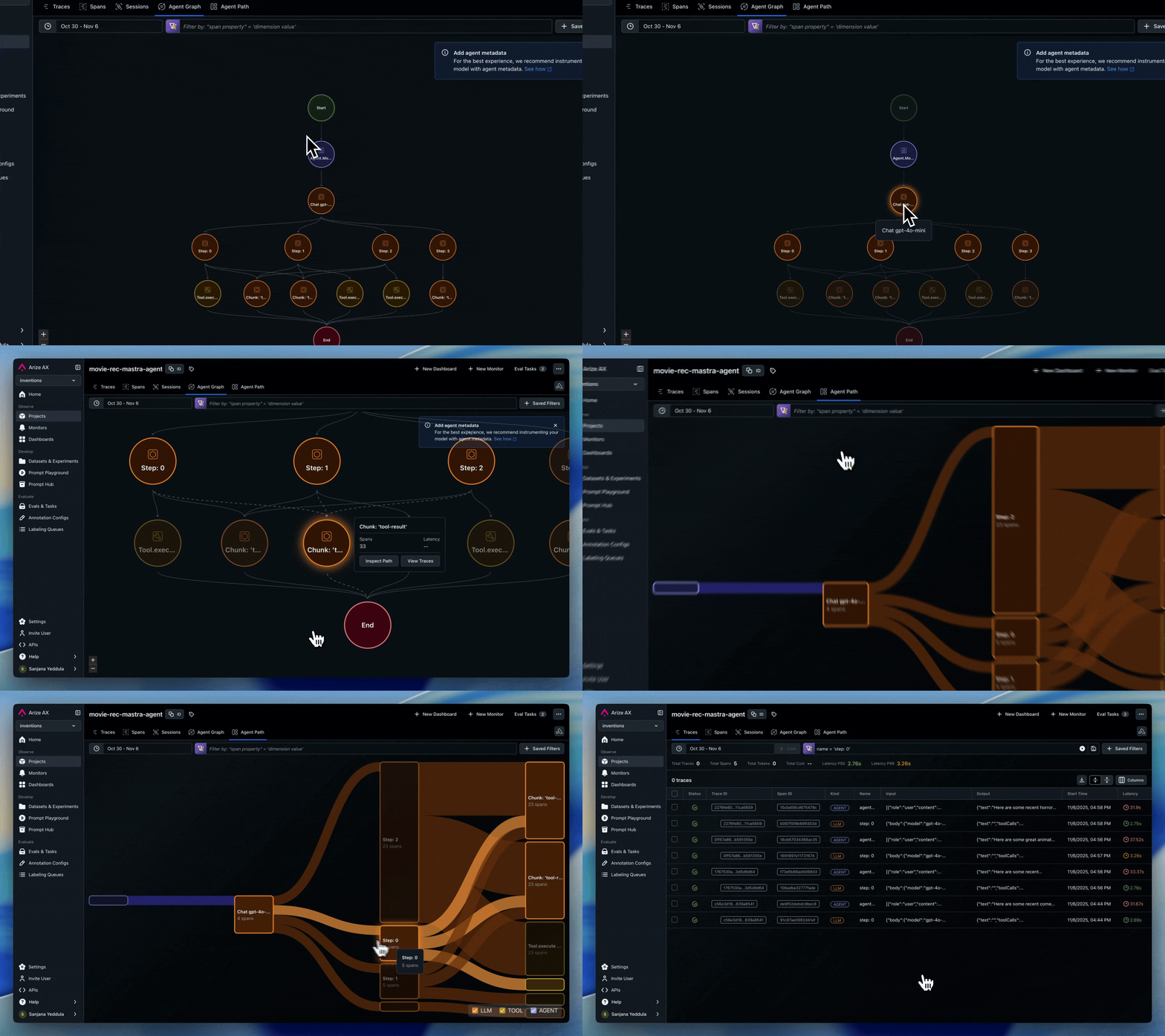
You’ve seen the [Agent Graph and Path views](/docs/ax/observe/tracing/view-and-manage-traces) and want them for your project. Arize AX can visualize your agent’s execution as an interactive graph and path diagram — but it needs to know which spans represent agents and how they relate to each other. This page covers how to set that up.

If your agent framework is already supported, you don’t need to do anything — it works out of the box. For custom agents, you’ll add a couple of span attributes.

<Frame>
  <img src="https://storage.googleapis.com/arize-phoenix-assets/assets/images/agent-path-visualization.gif" alt="Image" />
</Frame>

<Info>
  Looking for how to *read* the agent graph and path views? See [Agent Insights](/docs/ax/observe/tracing/view-and-manage-traces) for a guide on what each visualization tells you and how to use them.
</Info>

# Implementing Agent Visualization for Arize

Agent and node visualization is designed to track high-level workflow components and their relationships, not every individual operation. Think of it as a "logical flow map" rather than a detailed trace view.&#x20;

This is powered by **span metadata** that identifies agents and defines the transitions between them. We automatically track these attributes for popular frameworks, so no additional implementation is needed. For other frameworks, custom agents, or hybrid systems, you can use custom implementation.&#x20;

* [Frameworks Supported](./#frameworks-with-built-in-support): LangGraph, AutoGen, CrewAI, OpenAI Agents, Agno
* [Custom Implementation Guide](./#custom-implementation)

# Frameworks with Built-In Support

The following frameworks have built-in support for agent metadata through their auto-instrumentors:

<Accordion title="LangGraph">
  * Automatically tracks agent nodes and graph transitions
  * Uses native `metadata.langgraph_node` and `metadata.langgraph_step`
  * Handles agent metadata and state transitions
  * **No additional implementation needed**
</Accordion>

<Accordion title="AutoGen">
  * Automatically tracks `graph.node.id` and `graph.node.parent_id`
  * Handles agent handoffs through `_handoffs` tracking
  * **No additional implementation needed**
</Accordion>

<Accordion title="CrewAI">
  * Automatically tracks agent roles and task relationships
  * Includes agent metadata in spans
  * **No additional implementation needed**
</Accordion>

<Accordion title="OpenAI Agents">
  * Handles agent metadata via `OpenInferenceTracingProcessor`
  * Tracks handoffs between agents
  * **No additional implementation needed**
</Accordion>

<Accordion title="Agno">
  * Tracks agent names and team relationships
  * Includes agent metadata in spans
  * **No additional implementation needed**
</Accordion>

# Custom Implementation

## When Custom Implementation Is Needed

Custom agent metadata tracking is required when:

1. **Using frameworks without built-in support**:
   * Vanilla OpenAI / Anthropic calls
   * Custom agent implementations
   * LangChain without agent components
   * Other unsupported frameworks
2. **Using hybrid instrumentation**:
   * Mixing auto-instrumented frameworks with custom code
   * Building custom agents that interact with instrumented frameworks

## Required Metadata Attributes

To enable agent and node visualization, include the following metadata:

<table><thead><tr><th width="225.5546875">Attribute</th><th width="196.80078125">Description</th><th width="327.296875">Required</th></tr></thead><tbody><tr><td><code>graph.node.id</code></td><td>Unique name for the agent/node</td><td>✅</td></tr><tr><td><code>graph.node.parent\_id</code></td><td>ID of the parent node (if applicable)</td><td>Optional, but recommended. We will infer the graph using the relationship of the spans within the trace if this is not included</td></tr></tbody></table>

### Example Hierarchy

| Attribute              | Example                              |
| ---------------------- | ------------------------------------ |
| `graph.node.id`        | `"input_parser"`, `"research_agent"` |
| `graph.node.parent_id` | `"main_orchestrator"`                |

The example creates this structure:

```
main_orchestrator
├── input_parser
├── content_generator
│   ├── research_agent
│   └── writer_agent
└── quality_checker
```

You **do not need to annotate every span**. Only annotate those components you want represented in the graph.

## Example Implementation

### Basic Pattern

```python theme={null}
# 1. Add graph attributes to your spans
def add_graph_attributes(self, span, node_id: str, parent_id: str = None):
    span.set_attribute("graph.node.id", node_id)
    if parent_id:
        span.set_attribute("graph.node.parent_id", parent_id)
    span.set_attribute("graph.node.display_name", node_id.replace("_", " ").title())

# 2. Use in your tracing code
with self.tracer.start_as_current_span("my_operation") as span:
    self.add_graph_attributes(span, "my_component", "parent_component")
    # Your logic here...
```

### Multi-Level Hierarchy

```python theme={null}
# Root level (no parent)
with tracer.start_as_current_span("main_workflow") as main_span:
    add_graph_attributes(main_span, "orchestrator")

    # Child level
    with tracer.start_as_current_span("parse_input") as parse_span:
        add_graph_attributes(parse_span, "parser", "orchestrator")

        # Grandchild level
        with tracer.start_as_current_span("validate_input") as validate_span:
            add_graph_attributes(validate_span, "validator", "parser")
```

***

## Next step

Define the metrics that matter to your app:

<Card title="Next: Set Up Custom Metrics" icon="arrow-right" href="/docs/ax/observe/projects/custom-metrics-api" />
