

Signal and managed agents are generally available: Continuous monitoring and automated fix proposals
July 29, 2026 New Agents Signal reviews your production traces on a schedule, groups recurring failures into ranked issues, and writes each one up with the supporting evidence, a likely cause, and a proposed fix. The telemetry you already collect becomes an input that an agent can act on rather than something only a human reads. With a repository connected, a managed agent carries that investigation into your codebase, proposes the change, and opens a pull request. The cause and the proposed change are already written when you open the pull request, you just need to decide whether to ship rather than where to start. Signal and managed agents are now live in both the US and EU regions, with Signal included on every plan and managed agents available on Enterprise.
- Bring your own Anthropic key — mark an Anthropic provider as eligible for agents, then use it on individual presets, on Signal, or as the space-wide default. Enterprises that require customer-owned keys only can request that Arize disable the Arize-managed integration.
- Custom roles for managed agents — grant
MANAGED_AGENT_READ,MANAGED_AGENT_CREATE,MANAGED_AGENT_UPDATE, andMANAGED_AGENT_DELETEindependently to separate who can view agent runs from who can start them. - Slack for managed agents — connect Slack and bind managed agents to the channels where your team already works.
- Skills for Agent-as-a-Judge — attach account-level skills to Agent-as-a-Judge evaluators.
Bind one service key across multiple organizations and spaces
July 29, 2026 New SDKs and REST APIs A single service key can now be bound to several organizations and spaces at once, each with its own predefined or custom role, instead of being limited to one space per key. CI pipelines, agents, and integrations that operate across several teams can run on one credential with per-scope roles, full RBAC checks at every scope, and a revocation that covers every bound space, which leaves you with fewer credentials to rotate and a cleaner audit trail. Create a multi-binding key under Settings → Service Keys, or programmatically through the REST v2 API, the Python and Go SDKs, and the AX CLI. The code example below creates one key bound to two organizations, with a predefined role in each space of the first and a custom role in the second:Score traces with your own remote evaluators on Enterprise accounts
July 27, 2026 New Evaluators Remote evaluators are now enabled for all Enterprise accounts. Register an HTTP endpoint you host, and Arize AX queries the span data, calls your endpoint, and joins the returned scores and labels back onto your traces, so you keep the scoring logic while the platform handles querying, scheduling, retries, error handling, and monitoring.- Your own systems and dependencies — the endpoint runs in your environment, so it can call your databases, internal APIs, and any library live, including packages that are not available to code evaluations in Arize AX.
- Proprietary and non-LLM scorers — return a structured score or label from rule-based checks, machine learning models, or an internal gateway, with no need to conform to a supported LLM provider format.
- External eval services — wrap a third-party scorer and still get Arize AX orchestration and analytics around the results.
- Compliance and data residency — evaluation runs on your own infrastructure, and any auth tokens or secret headers you configure are encrypted at rest and masked in the UI.
label, a score, or both. The code example below is a complete evaluator endpoint that satisfies the contract:
Find your data region’s OTLP and Flight endpoints in settings
July 27, 2026 New Tracing and Sessions A new Personal settings page brings your profile, appearance, and connection details into one place. Under Data Region, you can now copy the exact OTLP HTTP, OTLP gRPC, and Flight endpoints for the region your account is connected to, so you can point your OpenTelemetry exporter at the right host without looking it up or asking support.- Connection endpoints — copy your region’s OTLP HTTP, OTLP gRPC, and Flight endpoints straight from the Data Region section.
- Personal preferences — switch between light, dark, and system themes, set your display time zone independently of the active time range, and change your password.
Run Claude Opus 5 in the Playground, Prompt Hub, and evaluators
July 24, 2026 New Models and Integrations Select Claude Opus 5 from the model picker to prototype prompts, run experiments, and score traces with Anthropic’s latest frontier model. It’s available through the direct Anthropic API as well as AWS Bedrock and Google Vertex AI, and runs with adaptive extended thinking for complex reasoning.- Anthropic —
claude-opus-5 - AWS Bedrock —
us.anthropic.claude-opus-5andglobal.anthropic.claude-opus-5 - Vertex AI —
claude-opus-5@default
Fixes and improvements
July 23–29, 2026 Models and Integrations- Fix Sort the ML Models list page by name, volume, or created date again.
- Fix Run models on custom OpenAI-compatible endpoints that require
max_completion_tokensin the Playground, which now sends the token limit these endpoints expect.
- Fix Align an evaluator in Alyx reliably, with the evaluator loaded into the Playground before alignment begins.
- Fix View the evaluator list in Alyx for datasets whose evaluation tasks include a code-based evaluator.
- Fix Read experiment evaluation and annotation scores accurately in the comparison view, with non-finite values now rejected at ingest.
- Fix Manage custom OpenAI-compatible model endpoints through the
/v2/integrationsREST API, where they now return with theCUSTOMtype. - Improvement Work with experiments that have no associated dataset in the JavaScript and TypeScript SDK, which now accepts null dataset and version IDs.
- Improvement Grant or revoke API key creation for SAML-mapped users with a new developer-access control on each role mapping.
- Improvement Narrow the user activity view with new exclude filters on source and kind, not just match filters.
Chart dataset and experiment distributions on your dashboards
July 21, 2026 New Dashboards and Visualizations Bar chart widgets can now be backed by datasets and experiments, not just project models, so you can visualize how any column, annotation, or evaluation is distributed across a dataset or experiment run directly on your dashboards. Click a bar to drill straight into the underlying dataset examples or the experiment comparison view. Learn more about dashboard widgets.Run Gemini 3.6 Flash and Gemini 3.5 Flash-lite in the Playground and evaluators
July 21, 2026 New Models and Integrations Selectgemini-3.6-flash and gemini-3.5-flash-lite from the model picker to prototype prompts and score traces with Google’s latest Flash lineup. Both models are available through the direct Gemini and Vertex AI providers, support a 65,536-token maximum output, and accept audio file input.
Learn more about model integrations.
Manage annotation configs, dataset examples, and restrictions from the CLI
July 21, 2026 New CLI Commands Three new AX CLI commands let you script more of your workspace management: update an existing annotation config, delete specific examples from a dataset version, and list the resource restrictions in your space. The code example below runs each of the three new commands:Review Signal issues across your whole agent fleet
July 21, 2026 New Agents The Agent Swarms page now surfaces Signal issues from every project in one space-wide view, grouped by severity, so you can triage your agent fleet without opening each project’s Signal tab one at a time. Open any issue to read its investigation and act on it in place, whether you add it to a dataset, create an evaluator, or open a fix PR. When you enable Signal on a project, you can now choose which agent integration runs it instead of defaulting to the Arize-managed runtime. Learn more about Signal.Connect AWS Bedrock, Vertex AI, NVIDIA NIM, and custom endpoints through the REST API
July 20, 2026 New Models and Integrations The/v2/integrations REST API now supports four more LLM providers, so you can provision AWS Bedrock, Vertex AI, NVIDIA NIM, and custom OpenAI-compatible endpoints programmatically instead of configuring each one by hand in the UI.
The code example below creates a Vertex AI integration through the REST API and the CLI:
- REST
- CLI
Save and reuse custom dataset views
July 17, 2026 New Datasets and Experiments Custom dataset views are now generally available on every account, backed by durable storage so your saved configurations persist across sessions. Capture the columns, filters, and sort order you use most on a dataset’s examples, then switch between saved views instead of reconfiguring the table each time.Fixes and improvements
July 16–22, 2026 Models and Integrations- Fix Use Anthropic Claude models through Vertex AI again, with request headers and parameters handled correctly for Vertex’s API.
- Fix Run GPT-5 and o-series models in the Playground on Azure, which now sends the token limit these models require.
- Improvement Evaluate longer sessions and traces with
gpt-4.1, now supported up to a 1M-character context.
- Fix Reference dataset columns by name in chained evaluators, including columns whose names match experiment outputs such as
inputoroutput. - Improvement Create evaluators with the scope preset to match the template you start from, so Session and Trajectory templates no longer default to Span.
- Fix Create and fetch template evaluators through the SDK and CLI without deserialization errors from the new
use_structured_outputfield.
- Fix Track LLM cost on spans imported through file upload, which now preserves the cost attributes on ingest.
- Improvement See tool-call arguments in the Input panel for tool spans sent with OpenTelemetry GenAI conventions.
- Fix Share a direct link to a specific session that opens with full context on the dashboard.
- Fix Jump to the latest available data reliably in an empty project view, without a previous project’s time range carrying over.
- Fix See correct timestamps at fine granularities in half-hour-offset time zones.
- Improvement Pass naive timestamps to any AX CLI command and have them interpreted as UTC.
- Fix Keep shared service API keys active after removing the user who created them.
See all experiments in one place, grouped your way
July 15, 2026 New Datasets and Experiments A new Experiments page in the left navigation brings every experiment in your space together, independent of the dataset each one belongs to, so you can review and compare results across projects without opening datasets one at a time. Group the view by target, source, or dataset to bucket related runs the way that fits your analysis.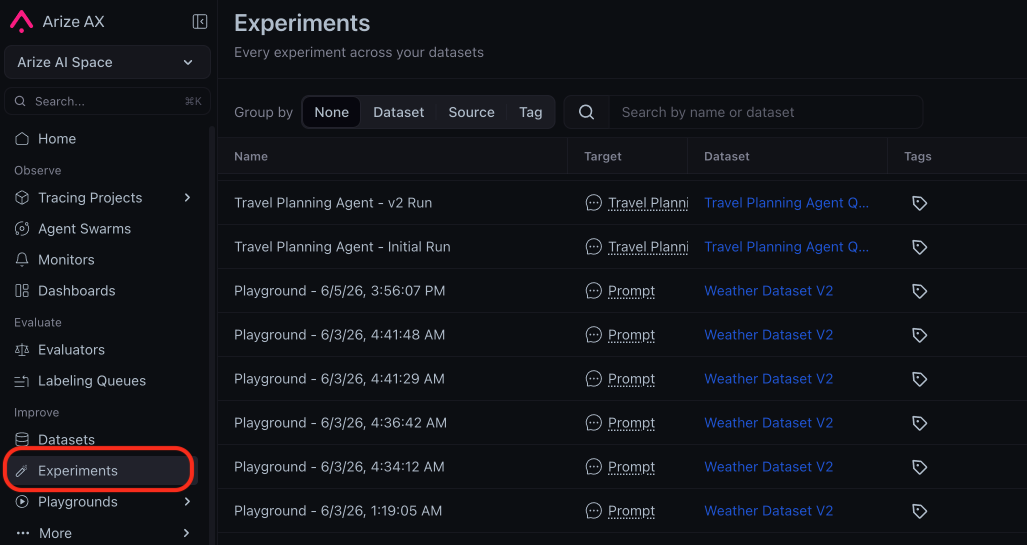
REST API v2 now uses consistent casing and schema names
July 15, 2026 Breaking SDKs and REST APIs The Arize AX REST API v2 follows one naming convention across every resource, so your generated client code and types stay consistent and predictable: enum values useSCREAMING_SNAKE_CASE, and request and response schemas follow a verb-first pattern. Update any hardcoded enum values and regenerate your client from the latest spec, because the API now rejects legacy lowercase enum values with a 400 instead of coercing them.
- Enum recasing — values such as
admin,openAI, andtemplate_evaluationare nowADMIN,OPEN_AI, andTEMPLATE_EVALUATION. - Verb-first schemas — response types such as
IntegrationListResponseandSpanDeleteResponseare nowListIntegrationsResponseandDeleteSpansResponse.
Model registry lists only actively supported models
July 14, 2026 Deprecation Models and Integrations The Playground and evaluators now offer only models that providers still serve. Models retired by their providers, along with the deprecated Gemini 2.0 family, are removed from the Arize AX model registry, and the default direct Gemini model is nowgemini-3.5-flash.
- End-of-life removals — retired OpenAI, Anthropic, Vertex AI, AWS Bedrock, and NVIDIA NIM snapshots, including
gpt-4-0314and the legacy Claude 3, 3.5, and 3.7 versions. - Gemini 2.0 deprecation —
gemini-2.0-flash,gemini-2.0-flash-001, andgemini-2.0-flash-liteare removed, and saved prompts that referenced them fall back gracefully.
Agent Playground and Remote Agents are generally available
July 13, 2026 Improvement Agents Agent Playground, Remote Agents, and Agent Experiment Traces are now generally available on every account, including self-hosted deployments, so you can run and compare agent experiments without a feature flag. The Improve navigation groups them with Prompt Playground under a single Playgrounds section next to Prompts. Learn more about agent experiments.Update existing dataset examples in place with the Python SDK
July 10, 2026 New Datasets and Experiments You can now update the content of existing dataset examples by ID with the newupdate_examples method in the Python SDK, so you can correct or enrich examples without recreating the dataset or losing example identity across experiment iterations. Apply the change in place on the current version, or pass new_version to capture it as a new dataset version.
The code example below updates two fields on an existing example, keeping its ID stable:
Attach multiple session and trace evaluators to a single task
July 10, 2026 New Evaluators You can now add more than one session- or trace-level evaluator to the same online task, so a single task can score conversations across several dimensions instead of being limited to one session evaluator. Learn more about session-level evals.Self-serve 13-month data retention on Pro plans
July 10, 2026 New Data Fabric Pro-plan users can now extend data retention to 13 months on their own, unlocking longer historical analysis as a self-serve upgrade. Start from a gated time-range preset (Last Month, 3 Months, 6 Months) or the Upgrade Retention button on the Pro plan card, and the add-on attaches to your existing subscription with an immediate prorated charge and no change to your renewal date. Learn more about pricing and usage.New OpenAI GPT-5.6 models in the Playground and evaluators
July 9, 2026 New Models and Integrations Three OpenAI GPT-5.6 models are now available anywhere you pick an OpenAI model, including the Playground and evaluators, so you can run prompts and LLM-as-judge evaluations on OpenAI’s latest lineup. Each model exposes a newmax reasoning-effort level for the most demanding tasks.
- Model options —
gpt-5.6-sol(frontier),gpt-5.6-terra(balanced), andgpt-5.6-luna(efficient). - Reasoning effort — choose from
none,low,medium,high,xhigh, and the newmaxlevel.
Bring your own Anthropic key for managed agents
July 9, 2026 New Agents You can now run managed agents on your own Anthropic API key instead of the Arize-managed default, so agent jobs use your provider account and quota. Mark an Anthropic provider as eligible for agents, then pick it as the runtime in the agent preset editor or the setup wizard, or set a space-wide default runtime so new agents inherit it automatically. Learn more about agent presets.Fixes and improvements
July 9–15, 2026 Tracing and Sessions- Fix Track accurate cost and token totals across agent and chain traces that report SDK rollups.
- Improvement Search on span start time, end time, and latency in the attributes panel, and include them in span exports.
- Fix Get completed results from evaluators you apply directly in the Playground.
- Fix Select Gemini 2.5 and newer models in the Playground model picker.
- Fix Track accurate trace cost for Vertex AI models.
- Fix Run non-pro GPT-5 models against custom and OpenAI-compatible endpoints that implement only Chat Completions.
- Fix Filter distribution widgets and monitors by the values you set.
- Fix Scope annotation configurations to the specific trace you apply them to.
- Improvement Submit dataset example annotations once at least one row is labeled.
- Improvement Tell Alyx how many spans to run a task on and whether to skip already-evaluated spans.
Enter spaces with any resource role you have been granted
July 8, 2026 Fix SDKs and REST APIs Custom roles with a space-level binding allow for entry into their spaces, so a user granted a single resource permission such as dataset access reaches the space in the UI and through the v2 spaces API. Any role binding in a space’s lineage grants entry, while per-resource permissions stay enforced on the resources inside.- Space entry gate — holding any binding in the space lineage, or legacy membership, is enough to enter the space.
- Full coverage — restores both the in-app space view and the
GET /v2/spacesandGET /v2/spaces/{id}endpoints for custom-role users.
Control Arize AX’s appearance with a System theme and refreshed light mode
July 7, 2026 New Dashboards and Visualizations Your profile menu now offers a System theme that follows your operating system’s light or dark setting, and light mode itself has a warmer, higher-contrast redesign, so Arize AX matches the rest of your desktop and stays easy to read.- System theme — choose System, Light, or Dark; System follows your OS appearance and switches live as it changes, with no reload.
- Refreshed light mode — a warm-neutral palette with layered elevation and vivid success, warning, danger, and info status colors.
- Accessibility — links, severe text, and input placeholders now meet WCAG AA contrast.
Fixes and improvements
July 6–8, 2026 Alyx- Improvement Alyx can now order aggregated results and return the top-N groups by a column you choose, so it can answer ranking questions such as which models drive the most cost.
- Improvement Code evaluator test runs now send only the dataset columns you have mapped to the evaluator’s arguments, so the test payload matches what the evaluator receives.
- Fix You can now drag to select text in the prompt variable editor.
- Improvement The trace slideover now hides the Evaluations and Annotations tabs by default and omits internal-only metadata from evaluation tables; re-enable the tabs anytime from Customize Tabs.
- Fix Trace field values that contain non-ASCII, multibyte characters are now truncated on character boundaries, so international text stays intact and valid.
- Fix You can now filter pivot table widgets on null or empty values and get the matching rows.
- Fix Webhook endpoints now accept requests that include a trailing query string, so integrations that append one deliver successfully.
Evaluate agents with new prebuilt trajectory and session evaluators
July 1, 2026 New Evaluators The evaluator gallery now includes seven new LLM-as-a-judge templates for agent trajectories and multi-turn sessions, so you can measure agent goal completion, path efficiency, and session quality without writing evaluation prompts from scratch.- New agent and session evaluators — Goal Completion, Path Efficiency, Reasoning Coherence, Session Resolution, Topic Coherence, Session Frustration, and Session Completion.
- Organized by workflow — templates are grouped into Response Quality, Code Quality, Trajectory, Session, RAG, and Security so you can find the right evaluator faster.
- Scope at a glance — each template shows whether it runs on a span, trace, or session.
- Security evaluators for everyone — the Security template group is now available to all users.
Capture more LLM and tool detail with new OpenInference span attributes
July 1, 2026 New Tracing and Sessions Arize now stores four additional OpenInference span attributes as typed, queryable columns, so you can filter and analyze traces on richer LLM, tool, and embedding metadata.llm.system— the system or provider that served the LLM call.llm.finish_reason— why the model stopped generating.tool.id— the tool-call identifier, now available as a top-level attribute.embedding.invocation_parameters— the parameters used for embedding calls.
Run prompts and evaluations on Claude Sonnet 5
June 30, 2026 New Models and Integrations Claude Sonnet 5 (native Anthropic) is now available across the Prompt Playground and LLM-as-a-judge evaluators, so you can test and evaluate your prompts on Anthropic’s latest Sonnet-tier model without leaving Arize.- Available everywhere you pick a model — select Claude Sonnet 5 in the Prompt Playground and when configuring evaluators.
- Automatic cost tracking — input, output, and cache token costs are recorded for every call, so spend shows up in your usage and evaluation costs.
- Adaptive reasoning — like other latest Claude models, Sonnet 5 manages its own reasoning effort, so the temperature, top-p, and top-k controls no longer apply.
Map evaluator variables to dataset columns in the Prompt Playground
June 29, 2026 New Playground You can now map evaluator template variables to differently-named dataset columns directly in the Prompt Playground, and Alyx can fill in those mappings for you, so you can run an evaluator over any dataset without rewriting its template to match your column names.- Per-instance variable mappings — a Mappings control on each evaluator instance maps template variables such as
{{input}}to dataset columns such asquestion, and warns you when a mapping is missing. - Automatic mapping with Alyx — the Align Eval flow detects column mismatches and applies the correct mappings before running.
- Preview with resolved values — the preview table shows each
variable → columnmapping alongside the resolved values.
Launch prebuilt agents with a guided setup wizard
June 27, 2026 New Agents Agent Studio now includes a guided setup wizard that walks you through connecting, configuring, and launching a ready-made agent, so you can spin up a purpose-built agent, such as an on-call SRE or a failing-trace investigator, without assembling skills, projects, and tasks by hand.- Ready-made agents — start from templates like SRE/On-Call, Investigate Failing Traces, Fix a Bug, Incident Commander, and Cost.
- Guided Connect, Configure, and Review — connect skills, point the agent at a project or repository, and launch it as a session or a recurring automation.
Analyze experiment trends with the new Experiment Analysis view
June 25, 2026 New Datasets and Experiments The redesigned Experiment Analysis view, a refined trend chart paired with a Scoreboard, is now the default charting experience on the dataset Experiments page, so you can spot performance changes across experiment runs at a glance instead of reading a flat summary line chart.- Trend chart — track how scores and metrics change across experiment runs over time.
- Scoreboard — compare the key metrics for your selected experiments side by side.
Fixes and improvements
June 25–July 1, 2026 Evaluators- Improvement You can now start an evaluator run on a dataset directly from the slideover in a single step.
- Improvement Your span Input/Output and Attributes display format (Pretty, Raw, JSON) now persists across sessions.
- Improvement The Projects flyout now lists recently viewed projects with a 7-day volume sparkline, and prompt tools appear as top-level navigation items.
- Improvement Added a Clear Filters action to the tracing table empty state so you can recover from a filtered-empty view in one click.
- Improvement Automation detail slide-overs now show the agent’s investigation report, with clickable references to the traces it examined.